Services

What is a Service Appointment?

A Service Appointment represents a Consultancy or Training session or sessions you have purchased.  These will be booked by our Professional Services Team.  You will be contacted by either your Project Manager or a member of our Scheduling Team to agree dates and times.

How to view your Service Appointments

To view your Service Appointments you will first need to login to the Support Portal. 

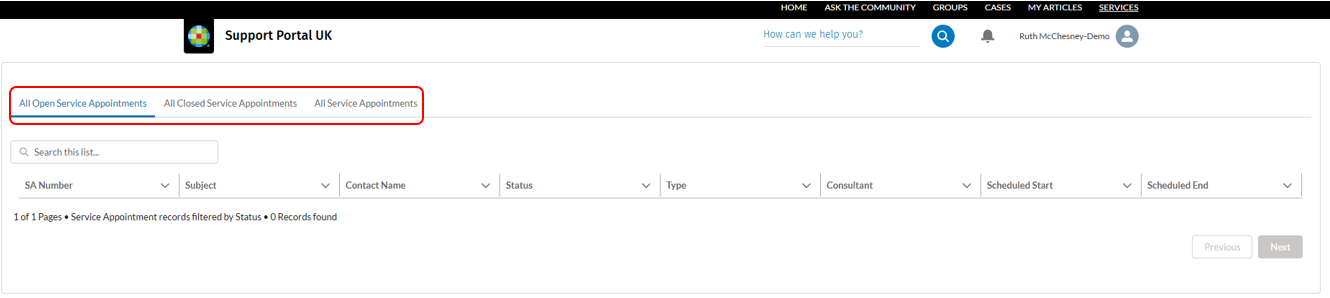
Where you are lead contact, you will be able to view all Service Appointments from the Services tab in the Support Portal. 

clipboard_e0b4c1919a08a767b2c855be41ca1b0e7.png

You can filter your appointments by 'All Open Service Appointments', 'All Closed Service Appointments' and 'All'.
clipboard_e3e1c9b83744fbad7f40c913a4cfc7bd6.png

  • 'All Open Service Appointments' shows you all 'scheduled but yet to be confirmed', 'confirmed' and 'in progress' appointments.
  • 'All Closed Service Appointments' shows you all Service Appointments that have been completed.
  • 'All' shows you all Service Appointments.

Who can view Service Appointments?

If you are the lead contact for the Service Appointments, you will be able to view them which means that if you are not the lead contact for the Service Appointments, you will not be able to view them.

You can request access to view all Service Appointments for your organisation by asking your Account Manager or Professional Services Planner to apply the correct access rights to your account. 

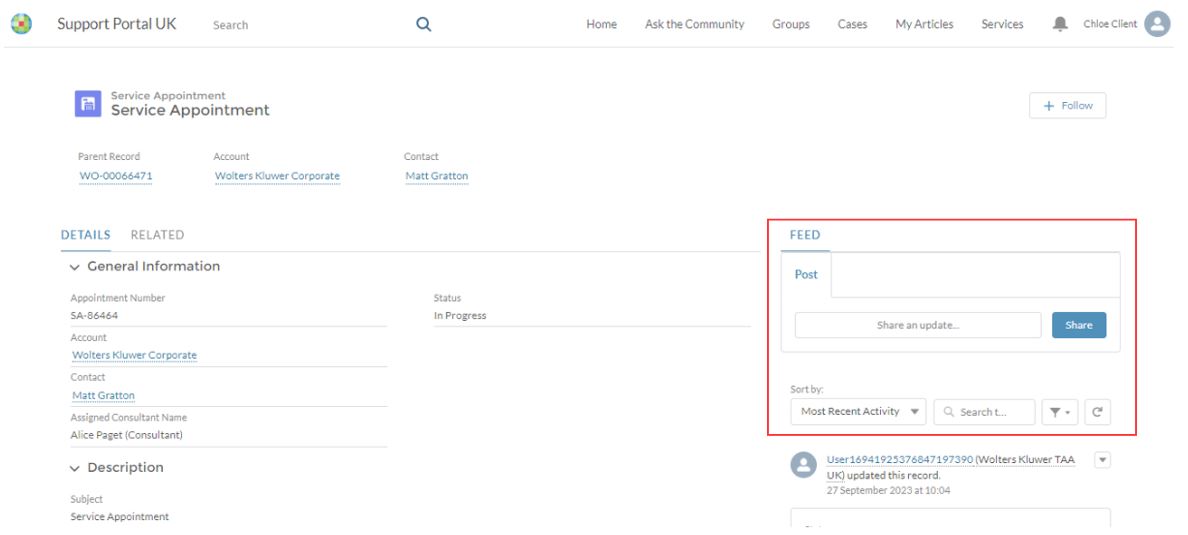
Having access to all Service Appointments will also allow you to click the 'Follow' button to receive updates on any Service Appointments you wish to have sight of.

3.JPG

How to view more information related to your Service Appointments

By clicking on the Service Appointment you will see more information about your Service Appointment.
4.JPG

How to view the agenda related to the Training/Consultancy Service Appointment

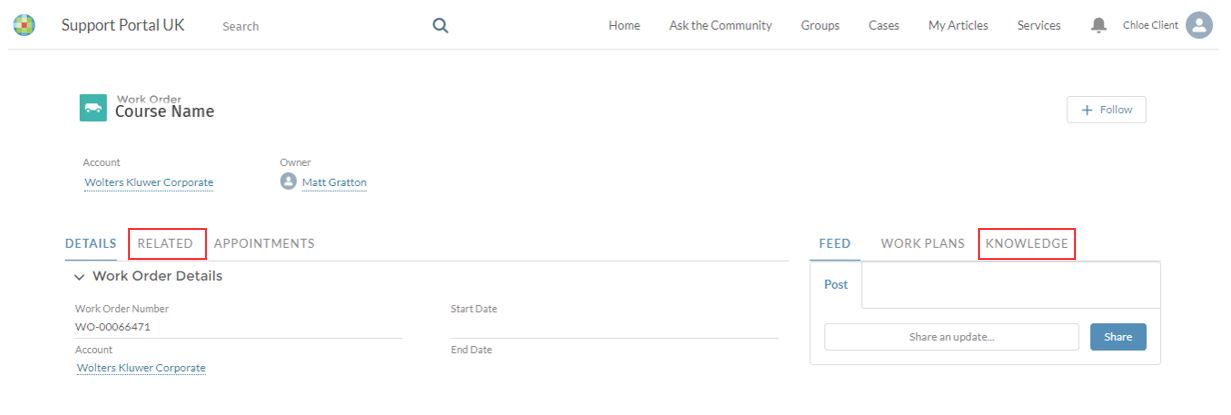
To view the course contents for each individual Service Appointment (where this is applicable), click 'Service Appointment'.  From here you will be able to click on the 'Parent Record' which is the Order line you purchased from your Account Manager. 

5.JPG

The knowledge area is located to the right or you can select an Article from the 'Related Quick Links' area in the header bar.  This will link you directly to the Course contents and any prerequisite you may require before attending the course.
6.JPG

Related documents

CCH Compliance Pack Implementation
This document outlines an implementation session aimed at assisting users with the effective set up of CCH Tax and Accounting software. The session will cover best practices, compliance options, pre-configuration checks, data migration discussions, and training opportunities. Key objectives include reviewing current processes and confirming tasks and responsibilities. Target participants are decision-makers and managers. The session lasts up to three hours and includes an agenda focused on operations, data security, compliance training, and useful resources such as eLearning and webinars.
Azure Information
This document provides guidance on selecting Azure architecture and hardware provisioning specifically for SQL Server. It recommends the Ebdsv5/Ebsv5 series for those seeking optimal performance and cost-effectiveness. Key advice includes prioritizing P core processors, focusing on clock speed over core count for SQL performance, and utilizing Proximity Placement Groups. Relevant Microsoft resources for best practices and pricing strategies are linked, as well as additional support materials for products and training from Wolters Kluwer.
CCH Accounts Production Corporate: Refresher (10134647/10134661)
A streamlined service for existing users who require a quick update or refresher on key processes within CCH Accounts Production. This service is ideal for those returning to CCH Accounts Production after a break or seeking to refresh their skills in line with current standards and software updates. 
CCH Accounts Production Corporate: Professional online (10134646)
An advanced programme for experienced users of CCH Accounts Production who wish to develop their expertise or update their knowledge. This service covers the latest updates, advanced functionalities, and troubleshooting techniques, helping users to stay current and maximise efficiency in their accounts production work. 
CCH Accounts Production Corporate: Practitioner (10134645/10134660)
A comprehensive onboarding programme for new users with little or no prior experience of accounts production software. This service covers accounts production for corporate entities, guiding users through CCH Central and CCH Accounts Production software.