
Migration Data Services : New Customers
Migration Data Services
For new customers transitioning from an existing system to their new CCH solution, we recognise that timing is crucial. Ensuring a seamless transition is essential for managing this change within your business effectively. Migration services involve our team managing the extraction of data from SQL backups of your previous system.
Migration data services facilitate the transition of your data from your old system to your new CCH solution. Our data consultants will extract your data from an approved competitor system, ensuring its accuracy before providing it to you for verification via spreadsheets. Similar to our import services, you retain full control over the quality and accuracy of your data. Once you have verified the data, we proceed with migrating it into your new CCH database.
The migration services involve a comprehensive process, requiring minimum interactions with your teams to ensure the defined scope is achieved. This service typically marks the beginning of your transition to the new CCH solution. The entire process will be overseen by one of our project managers, who will collaborate closely with your teams to complete the project, ensuring a smooth transition from your previous business solution to the new system.
The options available include standing data only or standing data combined with practice management data from a single primary source. For customers whose new CCH solution requires data from multiple sources, a comprehensive analysis and scoping exercise will be conducted.
|
Standing data migration (10127128) |
Standing data and practice management migration (10127129) |
New Customer Migration-Bespoke (10127132) |
CCH Pack Standing data and practice management migration (10130036) |
The below images represent typical milestones of a service and are not representative of a project schedule.
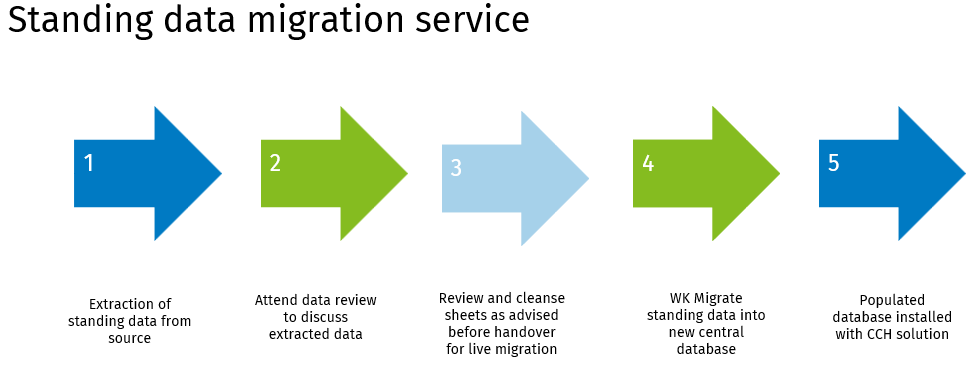
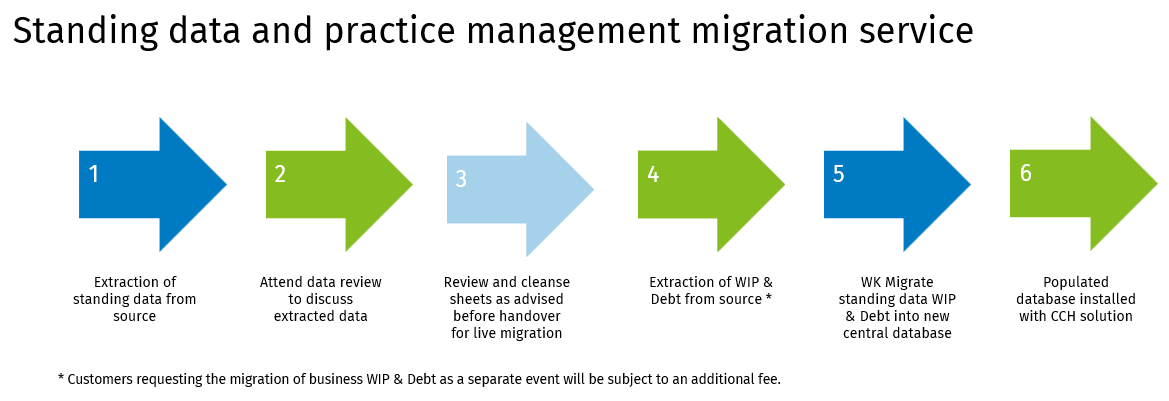
As new customers, we anticipate no downtime with your systems. Wolters Kluwer consultants will execute their phases of your project during regular business hours.
Further information on what data is included in our standard conversion projects for standing and practice management data is available in this section.
If your business needs are not listed, please contact your account manager to arrange a scoping session with our teams.
Practice management data - WIP & Debt positions
There are two options for converting WIP and Debt into your system:
- Open transactions, to include unbilled WIP, unpaid bills, and unallocated cash.
- Enables detailed transfer of outstanding WIP transactions to the CCH Suite, maintaining reporting levels by initial entry date, employee, WIP type, and service recorded against, where this level of detail is logged.
- Customers often choose this option when they can transfer detailed records to the new system. This normally takes place after they have completed their month end procedures.
- Open balances only for WIP and Debt as per client.
- Customers can start in the CCH Suite with a top-level outstanding WIP balance for each client when detailed WIP transaction records are unavailable.
When selecting the "go live" date, consider the current end-of-month processes, ensure month end procedures such as, timesheets and billing are completed and finalised.
If WIP and Debt need a separate conversion, additional services will be required to offline the database. This will incur extra charges, including possible out-of-hours fees.
Note: Transactional history of WIP and Debt, are not included.