
How To
Numeric Tag Maintenance - Dictionary
CCH IXBRL Review And Tag
Numeric Tag Maintenance - Dictionary
CCH iXBRL Review & Tag have provided you with dictionaries containing some common numeric and paragraphs descriptions used in accounts. They are located under the 'Automation' tab.

- After tagging of Detailed Profit and Loss, if you are using Learning Active, your numeric paragraph will be updated with the tags saved.
- It is also possible to add new entries to the numeric dictionary as per instructions below.
Numeric tag maintenance:
You may wish to change the text used to match the description in the row or the column to improve the matching for accounts for your organisation and this can be easily achieved.
To view the dictionary, select Numeric tag dictionary maintenance from the Automation ribbon and the Tag Dictionary Maintenance dialog will be displayed.
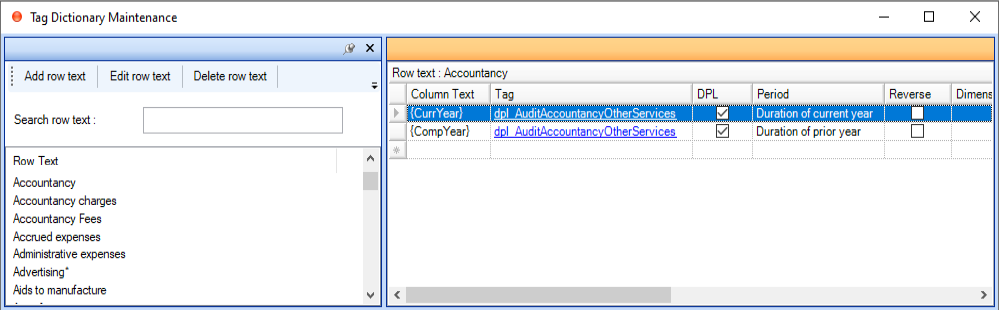
- The dictionary screen is divided into two halves. The descriptions in the left hand side are the row descriptions that will be used to match against the narrative in the accounts, e.g. Accountancy.
- On the right-hand side the Column Text is the column header against which the column text will be matched.
- The additional items on the right hand side of the screen are the tags which relate to that column heading, the date contexts which are to be applied, the dimensions and if necessary the reverse attribute to change the default debit to credit signage relating to the tag.
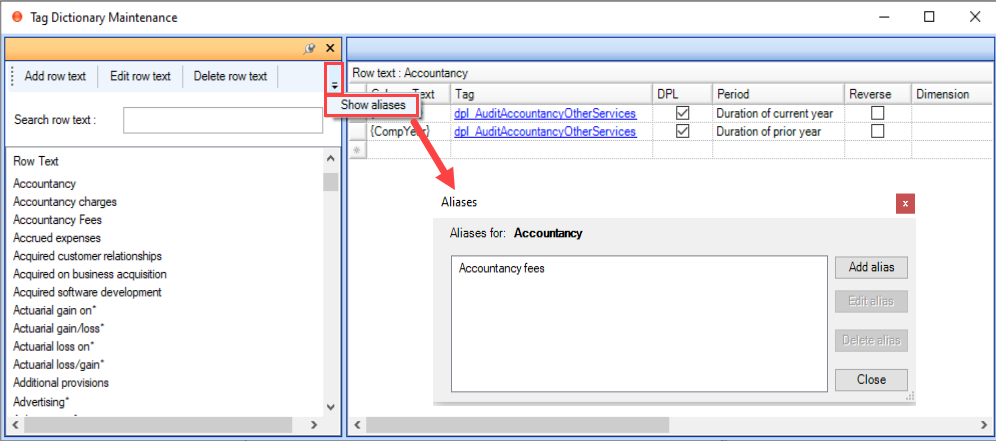
- In addition to the standard row text, to ensure the dictionary is manageable certain items will have aliases associated with them. Aliases are alternative descriptions for the row text where
- the description may be different but it is describing the same item.
- To see the aliases for a particular item, select the row text on the left and then select Show Aliases in the toolbar at the top of the list. Aliases can be added, deleted or edited using the buttons on the right hand side of the screen as below.
Editing existing row:
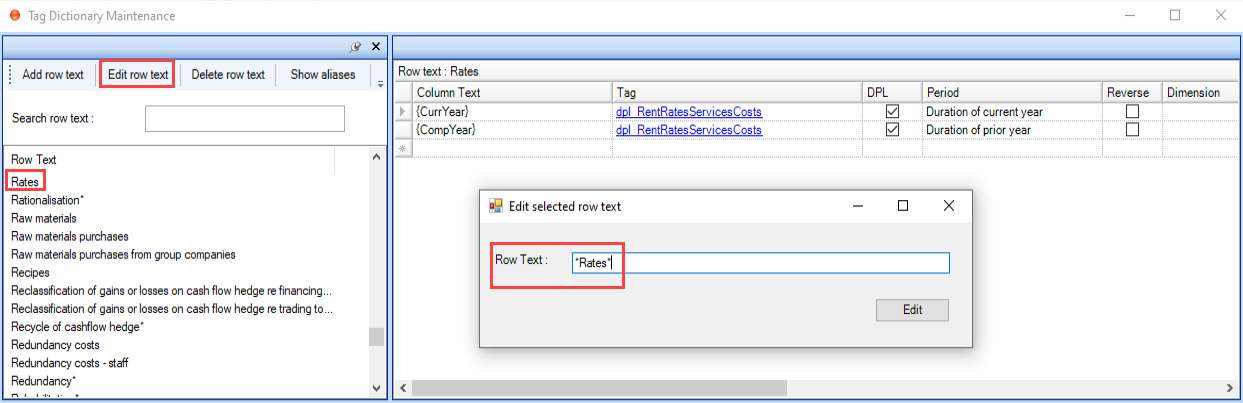
- If you would like to edit the narrative on the row text (left hand side of the screen) locate it in the list and the select Edit row text from the toolbar.
- This will allow you to change the text so that it matches your accounts more closely.
- When editing the row text, in addition to standard text you can also use the wildcard character “*” to allow the system to match with any text before or after the words included in the row.
Adding existing row:
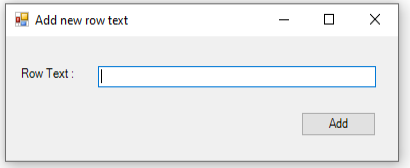
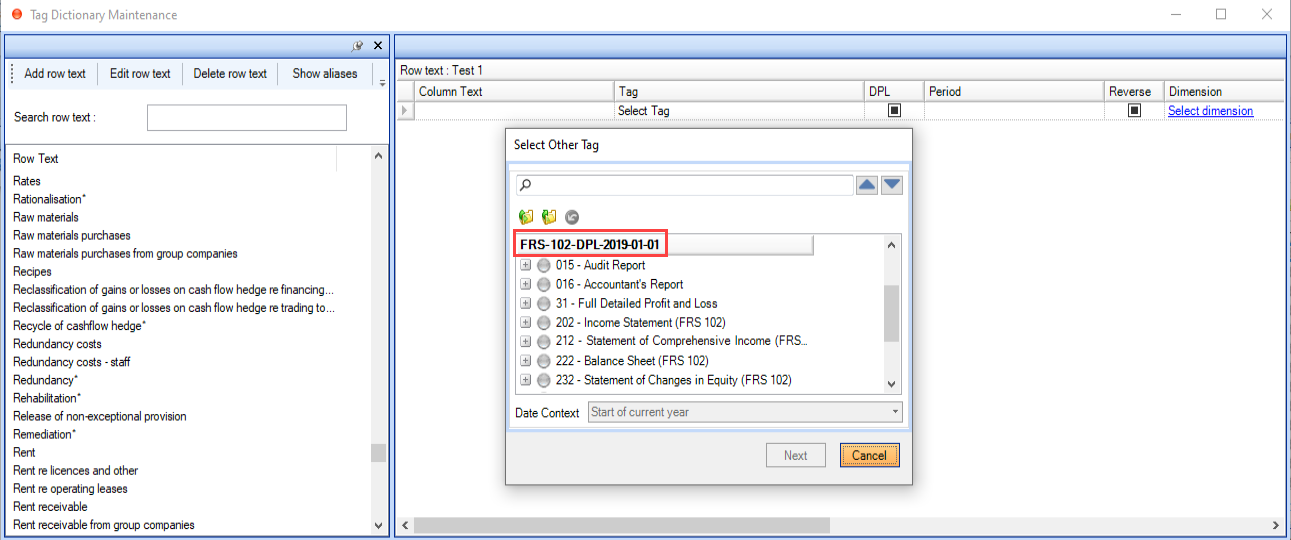
- To add a new entry to the dictionary select Add row text from the tag dictionary maintenance screen toolbar. The following dialog will be displayed.
- Add the text and click Add.
- Apply the tag and the date context which should be used on the row.
Related documents
CCH iXBRL Review & Tag: Training for Accounts conversion from MS Word and Excel (10133768)
This document outlines a training course for converting statutory accounts from Word and Excel into iXBRL format using CCH iXBRL Review & Tag. The course, lasting up to 3 hours, targets users needing to tag accounts for submission to HMRC and Companies House. Key objectives include understanding iXBRL requirements, importing documents, applying tags, and the submission process. Prerequisites include familiarity with accounts and having credentials for HMRC and Companies House. Additional resources such as eLearning courses and webinars are also provided for further learning.
CCH Accounts Production/iXBRL essentials training online (10133804)/(10133819)
This document outlines a course on using CCH Accounts Production software, aimed at helping new users efficiently produce statutory accounts. The course includes 1 x 2 hour session and 1 x 3 hour session focusing on practical skills such as setting up accounting periods, importing trial balances, and navigating the software. It is designed for all employees involved in preparing statutory accounts. Training is conducted in an interactive environment called CloudShare, with additional resources available online for further learning and support.
CCH iXBRL Review and Tag 2026.1
The latest release of CCH iXBRL Review and Tag
View
The document outlines the features of a software interface with two main tabs: "CCH iXBRL Review and Tag" and "Companies House Submission." The first tab provides product version details and access to review and tagging settings, which are further explained in a linked system administrator guide. The second tab includes functionalities related to the Companies House licensed module, with an option to update the license if it has expired. Visual elements include images depicting the interface for clarity.
Introduction: Tagging Detailed Profit and Loss
The document outlines the process for tagging the Detailed Profit and Loss (DPL) statement for HMRC compliance, indicating that it must be submitted with either Accounts or tax computations, but not both. It specifies that CCH provides two options for tagging the DPL: via the CCH Corporation Tax return or using CCH iXBRL Review & Tag. Additionally, a link is provided for further instructions on tagging the DPL through the Corporation Tax method.