
Pensions Accounts User Guide (SORP 2026 and FRS 102)
This is the user guide for the CCH Accounts Production Pensions accounts (SORP 2026 and FRS 102), updated for Master Pack 2.
CCH Accounts Production Pensions Master Pack
Introduction
This user guide provides accounts preparers with guidance on the preparation of Annual Reports under the 2018 Pensions SORP, FRS 102 and other regulatory guidance including the Occupational Pension Schemes (Requirement to obtain Audited Accounts and a Statement from the Auditor) Regulations 2016 (Statutory Instrument Number 229).
Scope
This Pensions Master Pack has been produced to provide compliant accounts for the following types of pension funds:
- Defined benefit (DB) schemes
- Defined contribution/money purchase (DC) schemes that require a set of financial statements to be produced
- Hybrid schemes - ie, where there are both DB and DC elements
- Small self-administered schemes (SSAS)
The pack does not cover the following schemes:
- Ear marked money purchase schemes
- Relevant ear marked money purchased schemes
The pack does not include:
- Lead schedules
- Management account formats
- Exception report
Client creation
Create the client in CCH Central if it does not already exist:
- Client type = Not for profit organization
- Business type = Other
On the Accounts Production tab, click in the grid to create a new accounting period, using the settings below:
- Type = Pension
- Entity = UK Pension Fund
- Master Pack = Most recent version
Small self-administered schemes (SSAS)
See Appendix B.
Hybrid schemes
See Appendix C.
Is an audit required?
Section 47 of the Pensions Act 1995 requires the trustees or managers of every occupational pension scheme to appoint auditors. Non-compliance by a trustee or manager with this section of the Act is subject to a civil penalty. The scheme Administration Regulations (S1 1996 No 1715, regulation 3) exempt a number of schemes from appointing Scheme Auditors. The schemes which are exempt from appointing a Scheme Auditor, include:
- Superannuation funds (schemes under section 615(6) of the Taxes Act).
- Unfunded schemes.
- Money purchase Small Self-Administrated Schemes (SSASs) where all members are trustees and all decisions are by unanimous agreement.
- Non-approved schemes.
- Schemes guaranteed by the Crown.
- Salvation Army, Devonport and Rosyth Royal Dockyards, Atomic Weapons Establishment and certain British Rail schemes.
- Certain public service schemes.
- Schemes with less than two members.
- Schemes providing only death benefits and which provide no accrued rights.
- Relevant earmarked schemes, which are money, purchased schemes where all benefits are secured by insurance or annuity contracts. These benefits are specifically allocated to individual members, and all members are trustees and all decisions are by unanimous agreement (SI 1997 No. 786).
Advisors and addresses
In a similar way to how the Limited Company Master Pack works, details of the Advisors and Addresses relating the Pension Scheme are obtained using Central Associations. Pension Schemes have additional advisors and address types compared to a normal limited company job. The list of Advisors that can be included in the statutory accounts is as follows:
| Secretary to the trustees | #se3 - Central Association "has secretary of" (Note: Title can be overwritten in statutory database grid) |
| Scheme administrator | #oa1 - Central Association "has other advisor of" (Note: Title can be overwritten in statutory database grid) |
| Principal employer | #sp1 - Central Association "has sponsoring employer of" (Note: Title can be overwritten in statutory database grid) |
| Actuaries | #at1 - Central Association "has actuary of" |
| Accountants / Auditors | #au1 - Central Association "has auditor of" |
| Legal advisors | #so1 - Central Association "has solicitor of" |
| Investment advisors | #ia1 - Central Association "has investment advisor of" |
| Investment custodians | #cu1 - Central Association "has custodian of the scheme's assets of" |
| Property managers | #pp1 - Central Association "has property manager of" |
| Property valuers | #sv1 - Central Association "has surveyor of" |
| Bankers | #bk1 - Central Association "has bank/bs of (accts prod)" |
| Investment manager | #oa2 - Central Association "has other advisor of" (Note: Title can be overwritten in statutory database grid) |
| Other advisor 2 | #oa3 - Central Association "has other advisor of" |
Other advisor 2 can have a title added to their name and this should reflect their position or occupation. This can be input using the Alias field on the Central Contact record.
The commonly used advisor types can have their titles overridden in the statutory database:

Trustees and advisors
The Trustees of the Pension fund should be entered via the Officers screen. This is a simplified version of the same screen in the company Master Pack. For pension schemes you only need to show the list of trustees along with the date of appointment and/or retirement.
Nominal ledger
The nominal ledger has two main sections:
0001 - 4999 Defined Benefit (DB) codes (with chart categories starting with DB)
5001 - 9999 Defined Contribution (DC) codes (with chart categories starting with DC)
Although there are many investments etc that are unlikely to exist for DC schemes, the codes for the two sections correspond to one another. Each DC code is simply 5000 more than its DB equivalent.
The codes are set up to provide:
- All matters shown in the 2026 SORP illustrative accounts
- Variations commonly seen in published accounts
- Additional user-defined codes in each area so that users can disclose further information
Within the two main sections, there are groupings that correspond to each disclosure item in the Fund account and Net assets pages.
Investments
Each main class of investment has one series of codes for DB and DC, eg for DB Property:
3100 Property - Market value brought forward
3110 Property - Additions at cost
3120 Property - Sales proceeds
3130 Property - Change in market value
(similarly, 8100-8130 for DC Property)
Note therefore:
- These four codes are the only disclosures required and therefore the user will make postings to these alone.
- Reporting further analysis within Property (eg by type or location) is carried out using statutory database grids for the separate note.
Cash deposit investments and short-term assets/liabilities
Movements are not shown for these and the postings are simpler, eg:
3700 Cash deposits - Market value brought forward
3710 Cash deposits - Net movements
3720 Cash deposits - Not used
3730 Cash deposits - Change in market value
(similarly, 8700-8730 for DC )
Derivatives
The total derivative postings are included in one group of codes. The derivatives note has grids to split this between assets and liabilities, and between the derivative types - Futures, Swaps, Options and Foreign currency exchange contracts.
Change in market value - income postings
The user can simply post the double entry for all the investment market value postings (eg 3730 above) to a single code (2000 for DB, 7000 for DC). There are further codes set up only for the user's own convenience, eg as below:
2000 Change in market value (if posting only the total)
2010 MV change - Equities
2020 MV change - Bonds
(etc)
Intangible assets and Tangible fixed assets
These would be rare for a Pension scheme. If held, the user should treat them as a class of investment asset.
Statutory database entries
The Statutory database reflects the key information needed for the scheme as a whole and the various sections of the acccounts, eg:
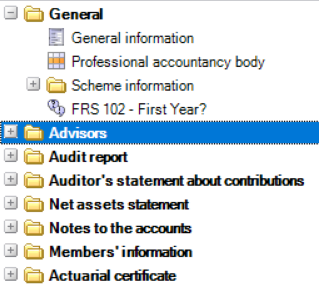
Scheme information
The Scheme Information section has options to configure the type of pension scheme and the relevant requirements.
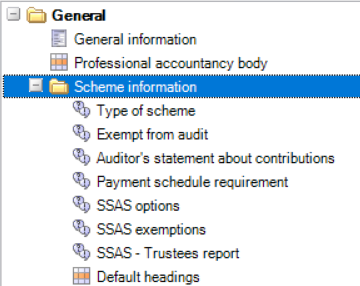
Scheme type and description for headings
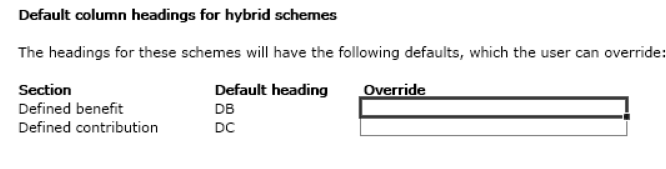
The user chooses the scheme type and can then override the column headings used where it is a hybrid scheme:

Where "Hybrid" applies for either the current or prior year, the formats will show columns for DB, DC and total for both the current and prior year. Otherwise, the additional columns are hidden and the formats show only the total.
Trustees’ annual report
This operates in the same way as the Directors’ report section in the company FRS 102 Master Pack. The headings shown indicate the general requirements of this report. Where possible standard wordings have been included as a basis for tailoring to the pension scheme’s circumstances. Within the master paragraphs there are a lot of suggestions. These suggested paragraphs have been prefixed with asterisks, eg as follows:
“**Particulars of how the scheme is managed, including:|who has powers to appoint and remove trustees, and method of appointment;|frequency of meetings, voting arrangements;|composition of the board of trustees including the number appointed by members and those by employers;|etc.
The Trustees Responsibilities Statement has been presented as a separate format, similar to the company FRS 102 and in line with proforma accounts. If you wish to include it as part of the main Trustees report there is a trigger question (#cz68) to allow this:

The membership of the scheme must be disclosed, split into beneficiaries, active members, deferred members, and pensioner members. The SORP suggests that this information be presented as a reconciliation from last year’s numbers, along with an explanation of any significant increase or decrease in membership. The Actuarial Liabilities disclosure may likewise be included with the main Trustee’s Annual Report, or presented as a separate disclosure as preferred by using the trigger question #px412:

The signatories for the Trustees’ Annual Report are specified in the Officers Screen.
Trustees’ responsibilities statement
This appears by default as a separate statement. There is however an option (#cz68) to include it as part of the Trustees’ Annual Report.
Investment report
The Investment management disclosures may be included with the main Trustees’ Annual Report or split out into a separate report as preferred, using the trigger question #px410:

Each memo field, with the exception of the three free text fields, has notes as to the type of information to be typed into the field. For example, the Review of business field has the following text:
- “***A review of the performance of the scheme's investments during the year (and over a three to five period) including an assessment of the nature, disposition, marketability, security and valuation of the scheme's assets.”
- The *** at the beginning of the text indicates that this is text that needs to be edited on a per client basis.
Audit report
This is consistent with that included in the FRS 102 Company master pack, but with references to the relevant pensions legislation.
Auditor's statement about contributions
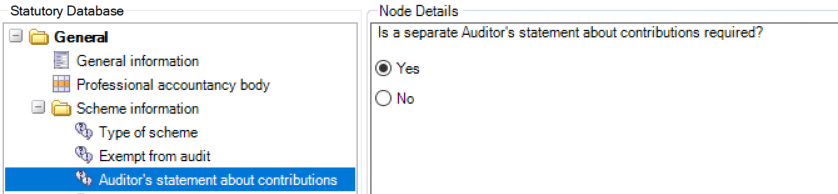
This is a requirement to provide a statement as to whether, in the auditor's opinion, contributions have been paid in all material respects, in accordance with the Schedule of Contributions or Payment Schedule.
This would be a requirement for all occupational pension schemes that are required to have audited financial statements, with the rare exception where the scheme has at least 20 participating employers. [Regulation 4 of the Audited Accounts Regulations]
The user chooses whether this is required:
Application to SSAS schemes
This audit concerning contributions does not apply to an SSAS scheme unless:
- The SSAS scheme is audited, or
- The auditor's statement about contribution is specifically required by the members or the trust deed.
Schedule of Contributions (DB) and Payment Schedule (DC)
Ordinarily, an auditor's certificate is required only for comparison of contributions received against a Schedule of Contributions related to DB schemes, as prepared by an actuary and confirmed in the actuarial certificate.
For DC schemes, there will instead be a Payments Schedule. This will not usually be audited, but it could be.
Hybrid schemes might be audited only for the DB element, or for both DB and DC elements. Therefore the user will in some circumstances need to clarify this:
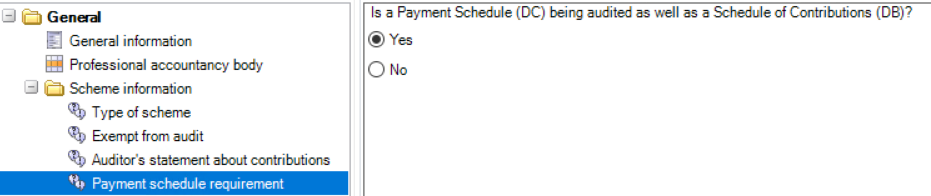
References to the two Schedules are governed by #px4 (Type of scheme) and #px5 (Payment schedule requirement):
- If #px4 = DB scheme only, the references will be to the Schedule of Contributions
- If #px4 = DC scheme only, the references will be to the Payments Schedule
- If #px4 = Hybrid, the assumption will be that only the DB contributions are audited, so
• If #px5 = n, the references will be to the Schedule of Contributions ONLY
• If #px5 = y, the references will be to BOTH the Schedule of Contributions AND the Payments Schedule
Accountants’ report
This is consistent with that included in the FRS 102 Company master pack.
Actuarial statement
The statement is required for defined benefit plans only. The Disclosure Regulations require the annual report to contain a copy of the appropriate certificate by the actuary under section 227 of the Pension Act 2004 about the adequacy of the contributions payable towards the scheme (certification of schedule of contributions). See SORP 3.34.7 for further details.
It has two parts:
- Adequacy of the rates of contribution
- Adherence to the Statement of Funding Principles.
Dates relating to the actuarial review are required for inclusion in other sections of the accounts, even where the actuarial statement itself is not required within the accounts.
Accounting policies
There are default paragraphs for the various policies, which should be tailored to the circumstances of the pension fund.
Notes to the accounts
The notes are listed below in the order in which they appear in the financial statements. Each of the notes has their own section within the Statutory Database and for some of them the only field they contain is a memo field for extra text.
Reconciliation of investments : This note includes various paragraphs as required by the SORP if applicable. It also includes two grids for entry of figures for disclosure purposes:
- Transaction costs, and
- Defined contribution assets allocated to members and trustees.
Fair value determination: A grid is provided to enter the level 1, 2 and 3 values for each investment by type and the subtypes specified in the SORP.
Investment risk disclosures: The detailed disclosures required by the SORP for the various types of investment risk have been catered for via various paragraphs. Investment strategy is split between Defined Benefit and Defined Contribution. Five paragraphs have been included for disclosures re each type of risk.
Contributions summary
The summary required for the auditors' certificate typically shows two groups of figures:
- Those required by the Schedule of contributions
- Other contributions made
The identification of the two groups, and the reconciliation of the full amounts with what is shown in the accounts, is carried out quite simply.
(1) Choose whether the figures from the accounts can be used without adjustment:

If "yes" is chosen, then the user does not need to enter alternative figures in the grid below. If "no" is chosen, ALL entries must be made so that the whole schedule is overridden.
However, the user always needs to identify which elements are required by the Schedule:

When "1" is entered next to a category, the format knows to place that item in the first half of the summary, as below:

Members’ information
If required, a page can be included with the Accounts detailing general information about Pension services that may be of interest to the Members of the scheme. This can be printed via the trigger question #px460:
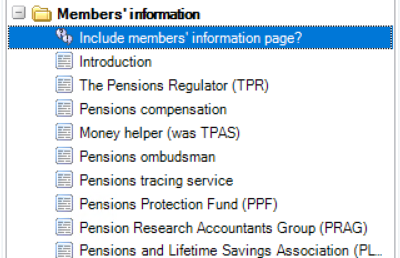
Where the page is triggered, the user can tailor the individual paragraphs
Actuarial certificate
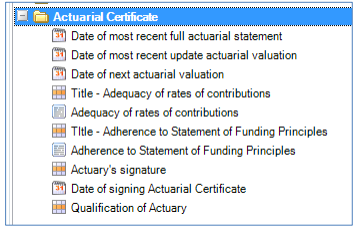
The final section in the Statutory Database allows the entry of details that will appear on the Actuarial Certificate included at the end of the accounts:
Appendix - Small self-administered schemes (SSAS)
Options
The following options are provided for these:
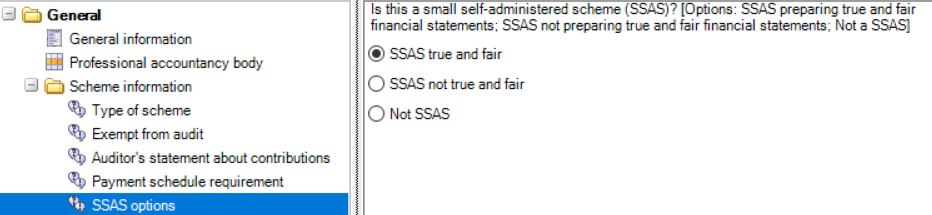
Where 'SSAS true and fair' OR 'SSAS not true and fair' is chosen, there is an exemption to consider. Choosing "yes" will suppress disclosures that are only required by the Regulations, but will leave disclosures required by the SORP or FRS 102 where relevant:
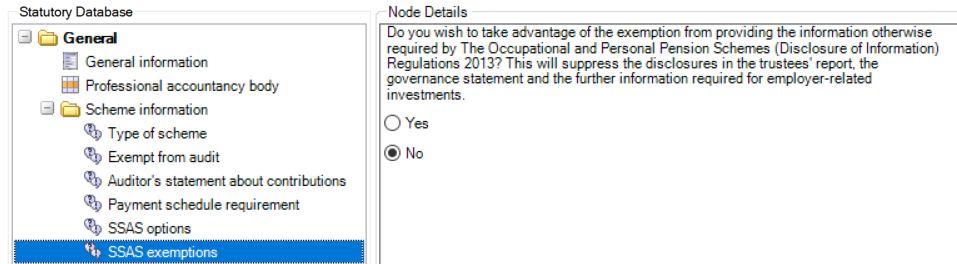
Where 'SSAS not true and fair' is chosen AND the exemption noted above has been chosen, there is a further exemption possible:
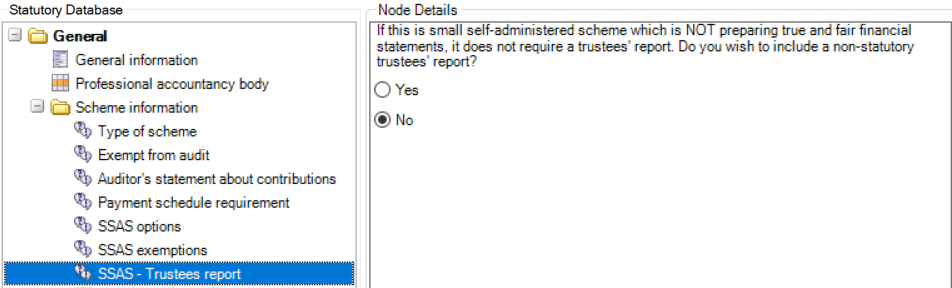
Note that where a non-statutory trustees' report is provided, it is the user's responsibility to amend the disclosures by choosing blank paragraphs and - where necessary - amending the format page.
Background
Where a scheme qualifies as an SSAS, it is exempted from providing the annual report information otherwise required by The Occupational and Personal Pension Schemes (Disclosure of Information) Regulations 2013, on the basis that all the members are trustees or managers of the scheme, and the scheme does not have more than 12 members.
Such a scheme will therefore have one of two types of annual report:
• Where the scheme is required by its trust deed or its members to have audited financial statements or financial statements that provide a true and fair view, it must apply FRS 102 and the Pensions SORP. Application of the SORP means that it will be required to produce a Trustees' Report. However, (1) It is not required to provide the additional information set out in the Regulations noted above; (2) Much of the trustees' report can be simplified or suppressed.
• Where the scheme is not required to produce financial statements that provide a true and fair view, it can prepare its financial statements in a much simpler fashion, so long as they are not misleading. It can also dispense with the trustees' report; alternatively, it can keep the trustees' report but simplify it as much as it wishes.
SSASs applying 'true and fair' can exclude any information which is solely required by the Regulations, eg:
- Analysis of membership and beneficiaries
- Pensions increases (DB schemes)
- Transfer value information (DB schemes)
- Governance statement DC schemes)
- Employer-related investments UNLESS the scheme is audited (note - user will need to deselect the paragraph).
SSASs not applying 'true and fair' will exclude the above and will also have the following suppressed entirely:
- Trustees' responsibilities
- Actuarial valuations
- Basis of preparation
- Accounting policies
- Distinction between allocated and designated investment assets (DC).
SSASs not applying 'true and fair' may also wish to suppress individual notes and simply show the primary statements, with or without a trustees' report.