Recording time in lieu
Record time in lieu
Time in lieu is the ability to keep track of time owed to the employee, for example, when a user has worked extra hours so that they can work a shorter day later in the week. Once you have set up the time in lieu feature, you can start recording your time against the time in lieu (LIE) activity code.
You have an allocated number of standard working hours. If you work more or less hours than this, you need to record a time in lieu entry in your timesheet to ensure that your time adds up to your standard daily amount of hours.
Tip: You can use the Paid Non-billable Time Report (by selecting filter (for the time in lieu (LIE) activity code as a filter) to manage the time in lieu in your firm.
Example 1: A long day in the office
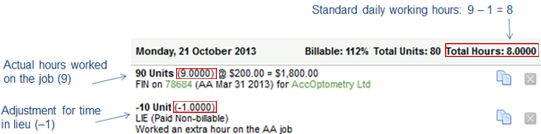
Your standard daily working hours are 8 but on Monday you work an extra hour, so you worked 9 hours in total. You need to make your daily timesheet balance to 8 hours.
- Hours worked = 9 hours
- Time in lieu = -1 hour (negative)
- TOTAL time recorded for the day = 8 hours
Recording time when the hours worked are more than the standard hours:
- Add a timesheet entry for the hours you worked billable/non-billable (9 hours in this case).
- Add another timesheet entry to adjust for the time in lieu:
- Select Non-billable/Paid Non-billable as the entry type.
- Select the Quantity of your time in lieu units (-1 hour in this case).
- Select LIE- Time in lieu as the Activity Code.
- Type a comment.
- Click Save.
Example 2: A short day in the office
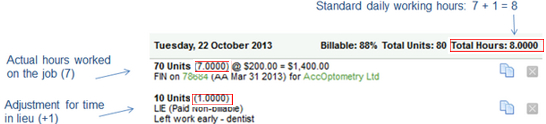
Your standard daily working hours are 8 but on Tuesday you leave work an hour early to go to the dentist, so you worked 7 hours in total. You need to make your daily timesheet balance to 8 hours.
- Hours worked = 7 hours
- Time in lieu = 1 hour (positive)
- TOTAL time recorded for the day = 8 hours
Recording time when the hours worked are less than the standard hours:
- Add a timesheet entry for the hours you worked billable/non-billable (7 hours in this case).
- Add another timesheet entry to adjust for the time in lieu:
- Select Non-billable/Paid Non-billable as the entry type.
- Select the Quantity of your time in lieu units (+1 hour in this case).
- Select LIE- Time in lieu as the Activity Code.
- Type a comment.
- Click Save.