
Ribbon
Ribbon
The Ribbon contains tasks/functions:

Close will close the period being worked on.
Online Filing- navigates to the online filing area where you are able to attach documents to and file your clients' Tax Returns to HMRC.
Online Filing displays in a separate tab.
The IR Mark version of the Tax Return is available in this area.
View offers a drop down to view ;
Computation
This generates the full corporation tax computation, from where you can view and print the iXBRL tagged computation.
The computation displays in a separate tab to the data entry tab.
The contents of the computation is displayed in the left hand Navigator panel providing hyperlinks to each computation report for ease of navigation.
Tax return
This previews the CT600 Tax Return and relevant accompanying supplementary pages for all accounting periods.
The Tax Return for each accounting period displays in a separate tab.
HMRC help
Access HMRC's Corporation Tax PDF help documents.
Notes Summary
This link provides you with a summary of all computation notes created for the period of account.
Estimates Summary
This link provides you with a summary of all statements flagged as estimated for the period of account
Hide/show unused sources toggles between inputted statements and all input statements shown in the Data Navigator.
Update from Accounts enables you to update information from CCH Accounts Production directly into CCH Corporation Tax.
Publish
Document Management allows you to upload documents into CCH Document Management.
This link will only be activated if you are licensed to use CCH Document Management.
Workflow
Start will start a Workflow for the period
FAR
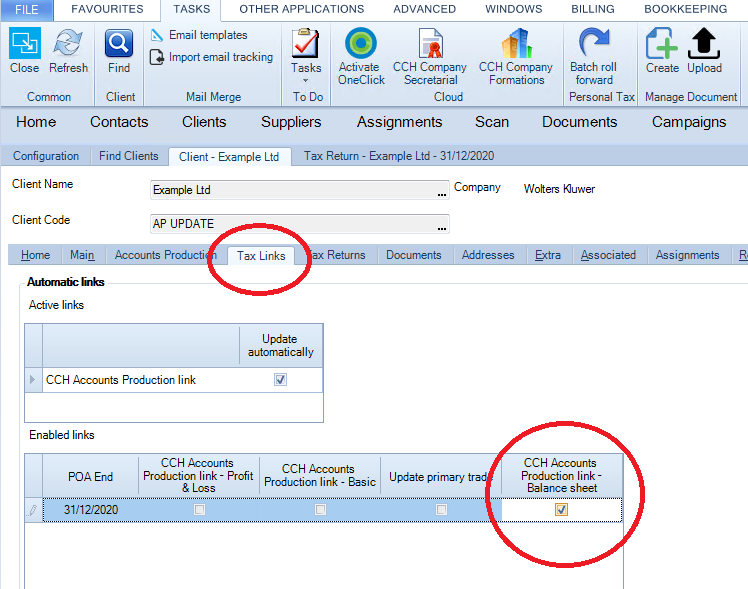
The Fixed Asset Register icon will be enabled if licensed and the CCH Accounts Production - link Balance Sheet flagged in Tax Links
Profit & Loss allows the insert or removal, tagging and saving and loading a template of the Profit & Loss.
Balance Sheet allows import and export of additions and disposals from Excel csv.file format and allows the Balance sheet template to be saved and loaded.
Profit and Loss Ribbon
The Profit & Loss panel contains 5 tasks/functions in the form of hyperlinks:
Insert (Remove) P&L
This allows you to Insert a Profit & Loss account into a period of account.
Remove P&L will appear when a Profit & Loss has been inserted.
Load P&L template
This allows you to load a previously created Profit & Loss template.
Save P&L Template
This function allows you to save a Profit & Loss template for use with other client Tax Returns.
Enable (Disable) P&L tagging
This function enables the iXBRL tagging facility present within CCH Corporation Tax.
Disable P&L tagging option will only be seen once Enable P&L tagging has been selected.
Delete all P&L tags
This link allows you to delete all Profit & Loss tags applied.