
Security FAQs
CCH OneClick - Security FAQs
Because of Azure and CCH Document Management storing information, does this effectively mean all information is duplicated?
For documents sent via Messages & Documents, Yes.
Can practices or customers opt to be excluded from external data use by Wolters Kluwer?
Yes, the Open Integration Programme is an optional feature that can be used by clients and if switched off and not configured there is no connection.
How are logins to CCH OneClick managed?
- Is password complexity & length enforced on CCH Central?
- Does CCH OneClick use Single Sign On (or Same Sign On) or does it use a separate username and password?
When a user is first activated for CCH OneClick they will be assigned their login details. Once these are entered through the CCH Central tab, the CCH OneClick login details will be stored against their central login details removing the need for the user ever having to login separately to CCH OneClick.
How will client access be managed in CCH OneClick? If an employee cannot see a client in CCH Central, will they also be blocked from seeing that client in CCH OneClick?
Yes, CCH OneClick utilises the team security that is already in place in CCH Central.
Is data anonymised and to what extent?
Currently data is not anonymised as it is remains under the control and ownership of our customers.
As we build out our vision Wolters Kluwer is looking at aggregating data which will support activities such as Business Intelligence, Reporting and Benchmarking and to support this the data would be anonymised and owned by Wolters Kluwer.
Is data encrypted in transit and rest?
HTTPS is used to provide encrypted communication between customer devices and CCH OneClick.
Communications between CCH OneClick and Third Party services, e.g. HMRC, Twinfield, Xero and Sage also use HTTPS to provide security of data in transit.
Encryption at rest is enabled for all Microsoft products that support it. Within CCH OneClick each customer has their own encrypted Azure SQL database. All files sent in messages are encrypted at rest. Open Integration stores data in Azure blob storage which is also encrypted.
What can the data be used for by Wolters Kluwer?
How Wolters Kluwer use Data
The initial focus of the Open Integration Programme is to access and use financial data from bookkeeping systems to support compliance processes such as Accounts Production and Making Tax Digital. The Open Integration Programme ensures data is collected from 3rd party systems and then made available, removing the necessity for training on multiple bookkeeping solutions.
Our vision with the Open Integration Programme is to be able to make greater use of this data enabling the practitioner to gain added value through benchmarking, data analysis and pro-active reporting. This anonymised data will provide practitioners with the information they need to deliver pro-active advisory services. To fulfil this vision there is additional work Wolters Kluwer will be focusing on in the next year.
What control do customers have over security?
User lifecycle management is performed via CCH Central. Permissions applied in CCH Central e.g. Client List restrictions are applied in CCH OneClick. As we develop the range of applications on CCH OneClick, we will be extending the data security and task permissions concept to ensure new functionality can be appropriately restricted.
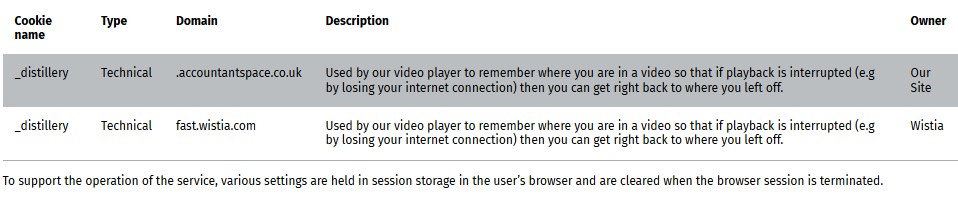
What cookies are used?
Our CCH OneClick platform supports the use of guidance videos and uses an external service from Wistia.
What frequency are applications patched?
Application patching is aligned with our published maintenance schedule. Any significant security issues that we identify are dealt with under our emergency fix process and follow our standard out-of-schedule notification process.
What frequency is the infrastructure patched?
Infrastructure is patched weekly.
What level of encryption is used?
- HTTPS using TLS uses various cipher suites of either 128 or 256-bit encryption.
- Azure SQL databases and Azure blob storage use AES-256 encryption. AES-256 is used to encrypt files stored on our platform.
What security testing is performed?
Our applications undergo rigorous security testing.
We put our applications through a rigorous testing process which includes static and dynamic application security testing (SAST, DAST); monthly vulnerability assessments; internal and Third Party penetration testing. In addition, the infrastructure that we host on is subject to regular vulnerability assessments and annual penetration testing.
Where and how is our data stored?
We use Microsoft Azure cloud services to host our CCH OneClick platform. All data is stored in Microsoft UK Data Centres (UK South, UK West).
This includes backups and DR.
Where are Azure locations within the EU?
They are currently in the UK, Dublin & Amsterdam
Who can access customer data?
Customers control who in their organisation can access the data in the CCH OneClick platform. CCH OneClick applications respect restrictions applied within CCH Central e.g. Client List.
A small number of our administration team can access the data held in customer databases. Access to the production databases is tightly restricted and can only be accessed via a secure administration network. Strong authentication controls are in place to secure access to the administration network and access is logged and monitored.
Who is responsible for the data?
Trust in cloud computing is based on the principle of shared responsibility. Wolters Kluwer is responsible for providing a secure platform for data storage and processing. Customers are responsible for operating controls to ensure that the data they put on the platform is accurate and only processed by appropriately authorised individuals.
Who owns the data?
Data that is not anonymised such as financial data used for compliance purposes is owned by the customer.
As we build out our vision Wolters Kluwer is looking at aggregating data which will support activities such as Business Intelligence, Reporting and Benchmarking and to support this the data would be anonymised and owned by Wolters Kluwer.