To view transactions, load the accounting period and then select View Transactions from the Functions area of the Task Bar. This displays a grid containing a list of transactions for the selected period.

Viewing Transactions

Accounts_Production_Data-Entry-Task-Bar_Transactions_View-Transactions_1.png

Select View Transactions from the Transactions folder in the Task bar to view the grid containing all Receipts, Payments and Journal transactions for the current period.  Depending upon permissions and whether or not you are using Open Integration through CCH OneClick this may be read only or editable. 

You may select the Debit/Credit view option on the ribbon to alter the column layout from displaying debits and credits as values to showing debits and credit by nominal code.  This option is not available if Receipts or Payments have been entered.

Accounts_Production_Data-Entry-Task-Bar_Transactions_View-Transactions_2.png

Editing Transactions

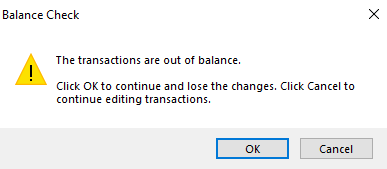
If you choose to edit any amount values from this screen, the set of changes made must balance before the application will save those changes.  If you move away from the View Transaction screen before your changes balance, you will see the following Balance Check message:
Accounts_Production_Data-Entry-Task-Bar_Transactions_View-Transactions_3.png

To discard the changes click OK, or cancel to go back and continue editing.

All changes made to the transactions listed will be recorded in the audit trail, which may be viewed for all transactions or selected transactions. 

Central also offers a report on changes in all CCH Central products, via File > Maintenance > Audit trail > View Audit Trail

Printing transactions

Within this screen we use List Report as the standard print layout.

Related documents

CCH Accounts Production/iXBRL essentials training online (10133804)/(10133819)
This document outlines a course on using CCH Accounts Production software, aimed at helping new users efficiently produce statutory accounts. The course includes 1 x 2 hour session and 1 x 3 hour session focusing on practical skills such as setting up accounting periods, importing trial balances, and navigating the software. It is designed for all employees involved in preparing statutory accounts. Training is conducted in an interactive environment called CloudShare, with additional resources available online for further learning and support.
CCH Accounts Production: essentials training online (10133819)
This document outlines a course on using CCH Accounts Production software, aimed at helping new users efficiently produce statutory accounts. The course includes two 2-hour sessions focusing on practical skills such as setting up accounting periods, importing trial balances, and navigating the software. It is designed for all employees involved in preparing statutory accounts. Training is conducted in an interactive environment called CloudShare, with additional resources available online for further learning and support.
CCH Accounts Production 2026.3 Hotfix: Release Notes
Release Notes for CCH Accounts Production 2026.3 Hotfix
CCH Accounts Production 2026.3: Release Notes
Release Notes for CCH Accounts Production 2026.3
CCH Accounts Production 2026.2: Release Notes
Release Notes for CCH Accounts Production 2026.2
