
What is it?
Driving business from intuitive dashboards in a single location
We have listened to our customer’s call for a business intelligence tool that does this and more. CCH Central is now integrated with Microsoft Power BI, giving you the ability to drive business insight from a single, intuitive location.
Power BI
| Power BI facilitates a data driven culture | Instantly share dashboards |
| A business intelligence tool - a hub and spoke system to take data from many places, so it can be visualised | Broader picture – leading companies are now data companies first (Amazon, Google, Tesla) that macro trend is relevant in an industry moving from compliance to advisory |
| Enables business leaders to short cut to decisions which will grow the business with the fewest calories burned | Data can be refreshed regularly with no manual intervention |
| View Power BI reports across multiple platforms and devices | Provide value-added services to your clients, with the right insight built |
Why use a business intelligence tool?
There is a trend beyond our industry around the opportunity to maximise business growth through harnessing data. You are sitting on a goldmine of data ready to be tapped into for insight around changing behaviours in practice, spotting cross-sell and upsell opportunities among clients, and refining strategy for future business growth.
Using Power BI with CCH Central
Become a data-first, growth orientated practice with bespoke business intelligence dashboards using the multitude of data housed in CCH Central showing:
• Weekly or monthly targets for your practice
• The full picture of your practice progress from the partners to the practice staff
• Leaderboards to motivate and encourage growth
Example Dashboards
Practice Dashboard
This is the first tab in the dashboard, and the design principle is to go from the very broad KPIs on the left-most tab, moving across towards the more granular analysis towards the right-hand side.
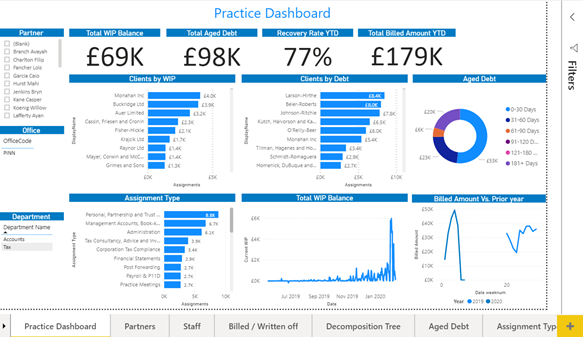
This tab contains most of the KPIs within this report – WIP, Debt, Recovery rates and Billed amounts. The slicers on the left-hand side allow you to slice this by Partner, Office, or department. Also, as most Power BI reports, slicing can occur by clicking on any element of the chart as well.
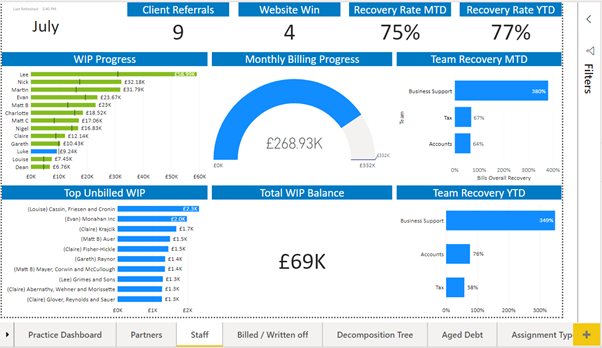
Staff Dashboard
Here we capture progress to target, in this case, WIP, but this is able to be customised to however practices target their staff, provided the data is accessible and in a reasonable format. Targets are sometimes stored in Excel files, brought into the model.
Customer case studies
View our customer case studies to see how other practices are utilising the efficiencies of Power BI.