
How To
Work in Progress
CCH iFirm Time and Fees
Work in Progress
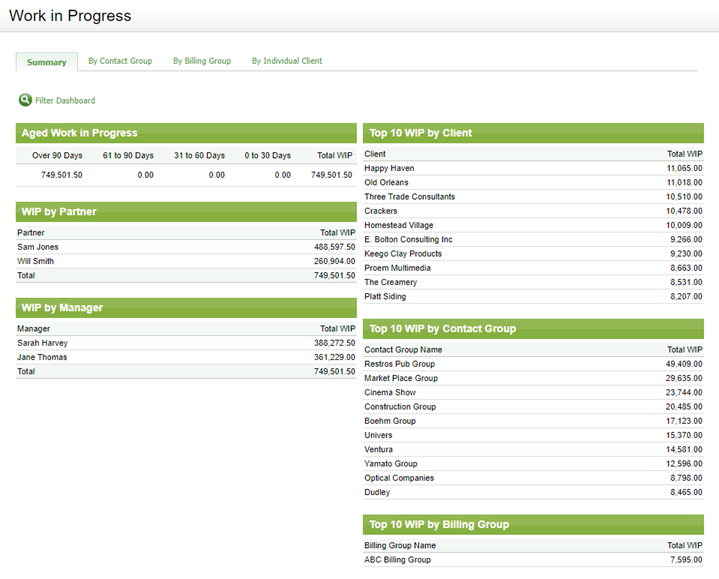
The Work in Progress area displays all the outstanding work in progress (WIP) for all open and closed jobs.
In Jobs & Billing, WIP consists of and can be broken down into:
- Timesheets (made up of time) - the time entered against the job.
- Disbursements - costs incurred by the firm on the job
- Adjustments - transferred WIP
Use the Work in Progress area to:
- View WIP By Contact Group, By Billing Group or By Individual Client.
- View your total WIP.
- Search for WIP.
- View WIP reports.
- Use the Actions menu to create invoices and manage write-offs / write-ups and transfer WIP.
Note: Pending transactions are not deducted in the Work in Progress area.

Related documents
Use interim or progress invoice text
How to use interim or progress invoice text
Recording time in lieu
You can set the general timesheet settings to automatically lock timesheets by date or job stage. Alternatively, you can manually lock timesheets for an individual job. When you do this, users will not be able to add, edit, or delete timesheet entries for that particular job.
View email contents
You can view the content of e-mails in the E-mail Centre. The e-mails are read-only, therefore, you cannot edit them.
Manage Email Templates
Templates are supplied for e-mailing invoices and statements, or you can add your own. You can delete these templates if you do not need them. You can set the default template in the billing entities area. You have the option of sending your e-mail as HTML or plain text.
Email Centre
The E-mail Centre displays client-related e-mails as well as some key internal e-mails.