The CCH Workflow Service has been enhanced to support multiple processes. As a result, the Workflow Service is more robust, and the efficiency and performance are significantly improved.

CCH Workflow can process volume workflow actions more quickly by running multiple processes on a single service. For example, if on the previous version it took around two minutes to start 100 workflows, in this release, it takes less than one minute to start the same number of workflows.

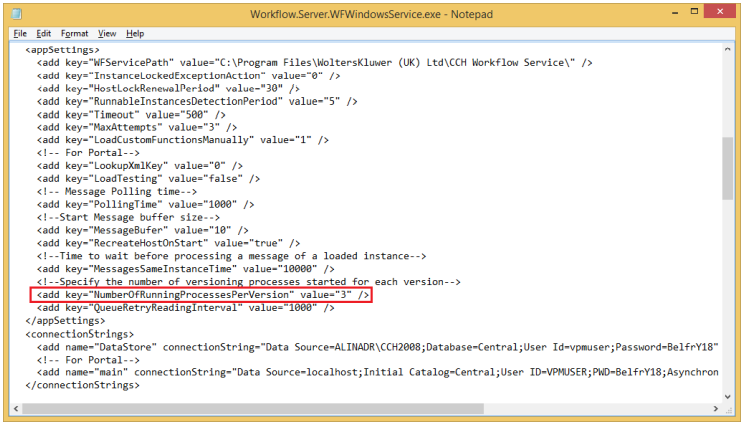
A new key, NumberOfRunningProcessesPerVersion, has been added, with the default value of 3, within the Workflow.Server.WFWindowsService.exe config file defining the number of processes that are set for the Workflow Service. The number of processes is configurable and it can be increased, but we recommend using three processes per service as each process is consuming memory even if it is idle.
clipboard_e81477e4d529f85a30cfae797ff14d115.png

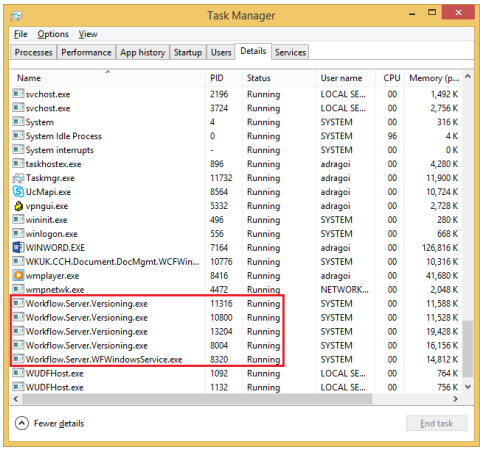
The processes that are running for the Workflow Service can be seen in the Details tab within Task Manager:
clipboard_ed2a3cbeba8011705735c3b206234a22e.png

When the service is started, one versioning process starts for the system workflows and then depending on the actions that are made within CCH Workflow other processes will start.

Starting or cancelling any workflows of any version starts the configurable versioning processes relating to version 2017.2. The number of these processes depends on the value that is set for the NumberOfRunningProcessesPerVersion key within the Workflow.Server.WFWindowsService.exe.config file.

If existing workflows are progressed a validator process is started for 2017.2 and if it determines the progressed workflows were started in a prior build version, then it will start each validator process going back through each build, until it matches the running workflow version and then it will start the configurable versioning processes for that particular build.

For example, if a workflow started in 2016.2 is progressed in this version, 8 versioning processes are started (if the value that is set for the NumberOfRunningProcessesPerVersion key is 3):

  • 1 versioning process for the system workflows.
  • 1 validator versioning process started for 2017.2
  • 1 validator versioning process started for 2017.1
  • 1 validator versioning process started for 2016.3
  • 1 validator versioning process started for 2016.2
  • 3 versioning processes started for 2016.2

Related documents

CCH Workflow 2025.3: Release Notes
The document provides release notes for CCH Workflow version 2025.3, highlighting installation prerequisites through the Central Suite Installer and introducing a new configuration key, Wf_DocumentExtraFields, which enables the merging of document extra fields. Firms wishing to disable this feature can adjust the key value. It includes legal disclaimers regarding accuracy and confidentiality, as well as trademark information. The content is proprietary to Wolters Kluwer (UK) Limited and is not to be reproduced without permission.
VAT Workflow : Quick Start Guide
This document serves as a comprehensive guide for managing VAT returns using the CCH Central Workflow system. It details the steps for creating a customized VAT workflow by saving the standard workflow as a practice-specific version, updating assignment responsibilities, and setting up VAT assignments and jobs. The guide covers the process for adding workflows to clients, customizing the homepage for workflow management, and tracking tasks within the workflow system. Additionally, it highlights automation features for task assignment and periodic workflow creation with links to further resources for detailed instructions.
Progressing the tasks
This document outlines the process for managing workflow tasks. Users can complete tasks via the Tasks homepage by selecting their names and using the ribbon bar for options like "Mark as complete." Multiple simple tasks can be completed in bulk. Tasks can also be reassigned to different employees, or specific employees can be selected for subsequent workflow steps. The document includes images to illustrate these procedures.
Progressing workflows
This document provides instructions on progressing tasks within a workflow homepage, detailing actions such as completing milestones, selecting outcomes, passing or failing tasks, and selecting employees. Users are guided on how to navigate the interface, including right-click options to manage tasks effectively. The document also mentions non-milestone tasks, directing users on how to reveal these tasks and proceed with their completion. Additionally, it highlights the ability to add comments to choices made within the workflow.
Introduction to the Workflow homepage control
The document provides an overview of the Workflow homepage control, detailing its functionality for monitoring workflow progression. It covers how to customize the interface, select workflows, and change view options, including due dates and employee views. The document also highlights the use of the "Field Chooser" for adding relevant columns, adjusting totals displayed for workflow steps, adding or editing comments, and applying filters to streamline the displayed workflows. Visual aids and step-by-step instructions complement the descriptions for ease of use.