
CCH Audit Automation (SQL) - Known Issues
CCH Audit Automation (SQL) - Known Issues
Last update: 07 May 2025
| Date Raised | ITS | Description | Workaround (if applicable) | Scheduled /Resolved |
|---|---|---|---|---|
| June 25 | 68308 | Pooltests being deleted from Identified risks after planning has been signed off | Currently the workaround is to add the pooltests until this is fixed | Fixed in 2025.3 |
| June 25 | 68305 | In 2025.1 SP1 the back up and restore routine is deleting 'Key Accounting Estimates', default 'Identified risks' and 'User created areas' | The workaround is to add the missing 'Key Accounting Estimates' and default 'Identified risks' again. As for 'User created areas' recreate the folders and reassign the documents which are still within the General documents folder in User Documents. | Fixed in 2025.3 |
|
April 25 |
68261 | With the latest 2025.1 a registry key is not getting created for new users. This results in the software splash screen launching but the software does not load. |
Add the registry key to resolve the issue. The key is located under the following path: Computer\HKEY_CURRENT_USER\Software\ProAudit.Sql |
Fixed in 2025.200 |
| Nov 2024 | 68170 | Sites who have upgraded to 2024.3 have reported that they get error 'Audit Automation AddIn' has fired an exception. |
There is no fix for the moment, if Audit Automation or Excel become unworkable the recommendation is to disable the Add In. |
TBC |
| May 2023 | 66656 | Upgraded to 2023.100 the client list appears as normal and then resizes the window and zooms out the text. Once the windows is set to full size again the font size is really small ie it remains zoomed out, even when in the client |
Recommendation is to set the display to 100% and the display resolution to 1680 x 1050. If this does not work may be take a look at the KB article below to see if it helps at all. https://help.wolterskluwer.co.uk/Cus...he-information |
TBC |
| Feb 2023 | 66553 | In this scenario; The user has balanced forward a client, then documents (any doc type like Word, Excel or PDF) cannot be accessed on the current year with the error; Access violation at address 11EF4390. Read of address 00000000. Previous year documents are accessible |
The work around is to delete the current period and roll forward again | Fixed in 2025.3 SP1 |
| Feb 2023 | 66543 | Cannot sign off planning as getting error "No procedures planned for Risk X: [name of risk ] Control Risk, but control risk is set to N/A | There is a workaround to fix the issue.
Note: The user need to revert the tick box, once the plannings have been signed off. |
TBC |
| Sep 2022 |
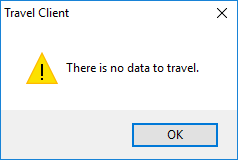
Traveling from audit will result in the following error: |
The plugin required to load the client data for traveling is being loaded at the point that traveling is started. It is taking several minutes to load the plugin before traveling can place. After trying to travel for the first time waiting for the plugin to load and then trying to re-travel will resolve the issue. Alternatively traveling the client from central instead. Once traveled you will be able to access the client data via logging into audit in the normal way. |
Fixed in 2025.1 | |
| Sep 2022 | Logging into offline mode | In some scenarios the local database data path may not be set up by the software automatically. If this is the case the user will be asked to provide the database connection details the first time they try to log into the local database. Select the Server name from the drop-down list, select windows authentication and then the CCH_Offline database from the available database name drop down list.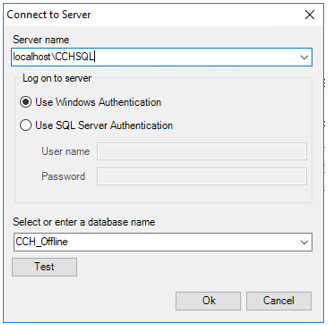 |
||
| Sep 2022 | Unable to start document management service | If both CCH Central and CCH Audit Automation are opened when either of them are already running or if either is opened twice the user will be presented with the following error message.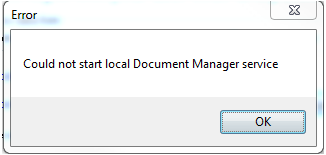 The message can be ignored as the local document manager service is already running. |
||
| Sep 2022 | Travelling Limitations – Corporation Tax Data | In some scenarios the local database data path may not be set up by the software automatically. If this is the case the user will be asked to provide the database connection details the first time they try to log into the local database. Select the Server name from the drop-down list, select windows authentication and then the CCH_Offline database from the available database name drop down list. | ||
| Sep 2022 | Network at client log in | When using the network at client log in the target machine's firewall must allow inbound connections for the machine to be visible on the list of available connections. | ||
| Sep 2022 | Deleting a client from CCH Central | When using the delete client option from CCH Central the documents attached to the audit periods are left as orphaned entries in the document database. When removing a client from central the audit periods should be removed first from audit as this will correctly delete the audit documents. | ||
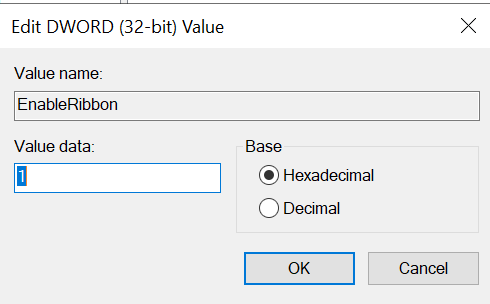
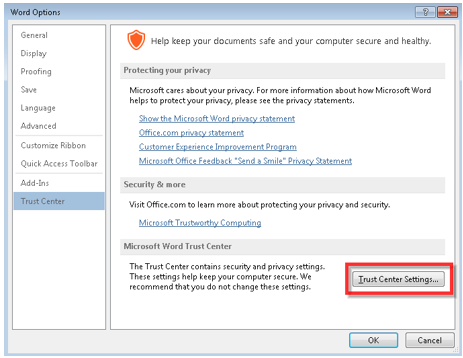
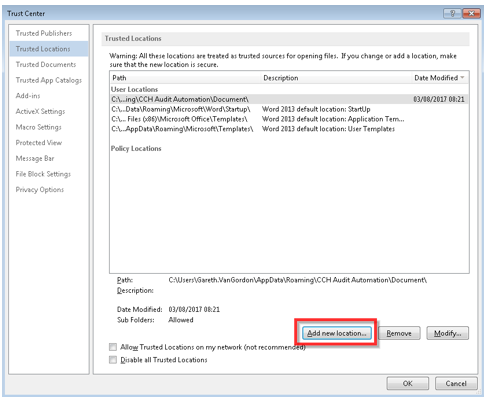
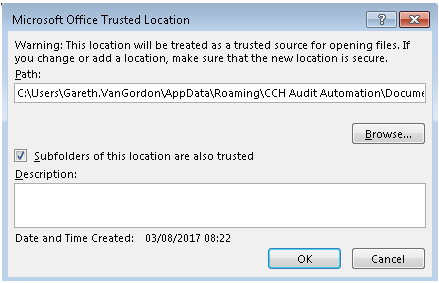
| Sep 2022 | Error when opening MS Word documents | Some users have reported the following error message appearing when opening MS Word documents.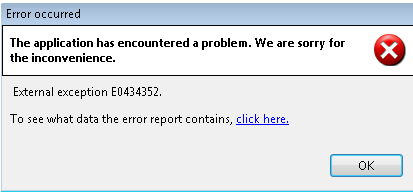 The issue is caused by the trust settings in MS word and can be fixed as follows:
|
||
| When importing a TB from CCH Accounts Production to CCH Audit Automation (SQL) by 'Update from CCH Accounts' option at Data Entry tab - only the current TB is available and the previous year TB is not imported. | If you can find only current year TB and you cannot find prior year TB, then please export the TB file as a .csv file and import it into CCH Audit Automation (SQL). | 2025.1 | ||
| Why is there a ? sign instead of the £ sign in my lead schedule? | To fix this please load the client and go to File > Control > Control Data > TB Control tab > change the sign in Reporting Currency > OK Note: There is no fix at master pack level, each client which displays the wrong sign will need to be updated accordingly. |
Useful Information! Join the CCH Audit Automation 'Group' on our Support Portal for automatic 'Posts' relating to CCH Audit Automation (SQL).