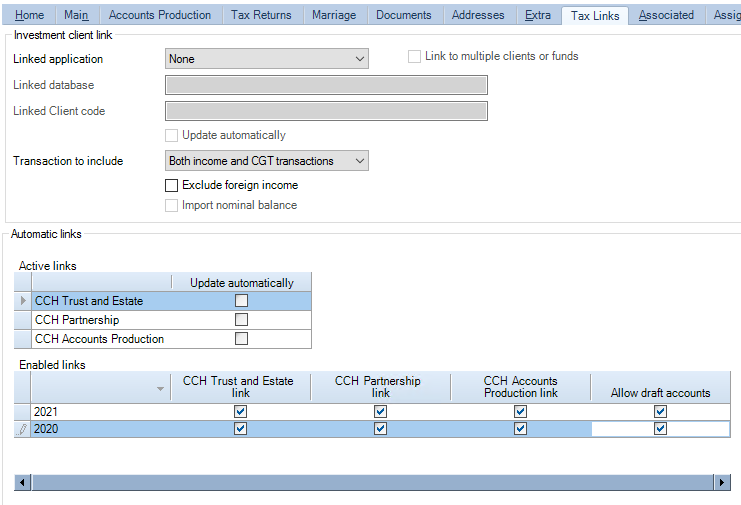
The Tax Links screen appears when you open a personal, partnership or trust client. It is used to specify what data is brought into CCH Personal Tax from CCH Accounts Production and the CCH Fixed Asset Register.
clipboard_ea2b2a0df327469bb3dc9751ee0380b35.png


When Update automatically - CCH Accounts Production is checked Personal Tax is automatically updated from CCH Accounts Production when a Tax Return is opened without needing to click Update from Accounts.

When CCH Accounts Production link is checked then Fixed Asset Register data is imported into CCH Personal Tax along with CCH Accounts Production data. This setting can be different for each tax year.

If it is not checked, then no data is imported from the CCH Fixed Asset Register into CCH Personal Tax ant any data previously imported can be freely edited.

Allow draft accounts - When data is exported from CCH Accounts Production, you must specify whether the data is Draft or Final. If you select Draft then Allow draft accounts must be ticked to allow it to be imported into CCH Personal Tax.

Information! Although, Update automatically causes the data to be read automatically into CCH Personal Tax, it still needs to be exported from Accounts Production first.

The other settings on the Tax Links screen are described in the CCH Personal Tax Help under Linking Products.

Related documents

Editing Additions and Disposals in Corporation Tax
This document provides guidance on how to manage Additions and Disposals in Corporation Tax, imported from the Fixed Asset Register. It explains the process for editing fields such as asset description and tax value, and highlights the importance of updating the Fixed Asset Register for more accurate data. Key actions include linking additions to the Capital Allowances screen and maintaining changes when re-importing data. It also covers the need to adjust Balance Sheet categories for small companies and how to unlink accounts for updates.
Part Disposals
Part Disposals
Changing Entity Type
Asset Movement
The document outlines the functionality of the Asset Movement screen, detailing how asset transactions are recorded in the Fixed Asset Register, independent of CCH Accounts Production. It describes five types of movements: Cost B/Fwd, Addition, Adjustment, Revaluation, and Disposal, each with specific criteria and purposes. The document also covers the protocol for asset movement dates, especially concerning finalized periods, and discusses the Change of Method movement for altering depreciation methods. Additionally, it includes guidelines on how movements affect nominal accounts and the conditions under which movement deletion is permissible.
Asset Classes
The Asset class section is used to define the ledger accounts which must be used for the posting of the asset transactions and the method of depreciation.