
How To
Appendix B
CCH Company Secretarial
First syncronisation
What to expect on the first Synchronisation?
- For exact matches, the system will link them together behind the scenes and the link will be seamless.
- For similar matches or records where there is no match in CCH Central, the records will show in the Draft Contact HomePage control and you should deal with them as instructed in the HomePage Controls chapter.
- The first synchronisation will take longer than future Synchronisations due to the number of records that will be pushed in one go.
- Once the first synchronisation is complete and you have merged or created any records that require action, updates will occur as per the configuration settings you have chosen.
A further configuration option
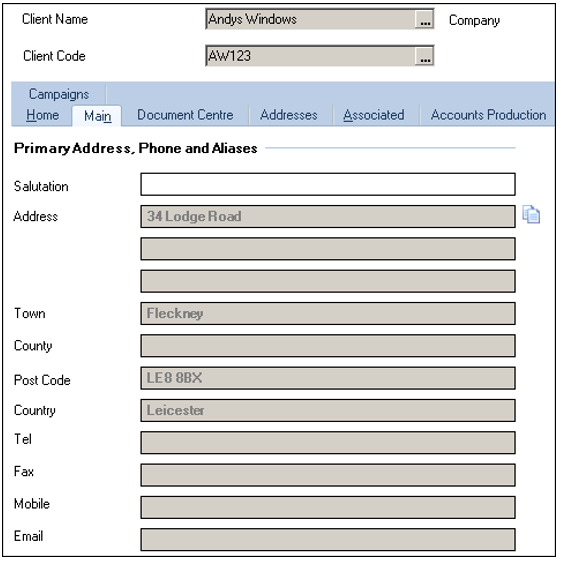
- You may decide that you want to push the contact address that resides within CCH Company Secretarial to the Main Primary Address within CCH Central.
- The following screenshots identify which Address fields from CCH Company Secretarial would be pushed to the Primary Address in CCH Central
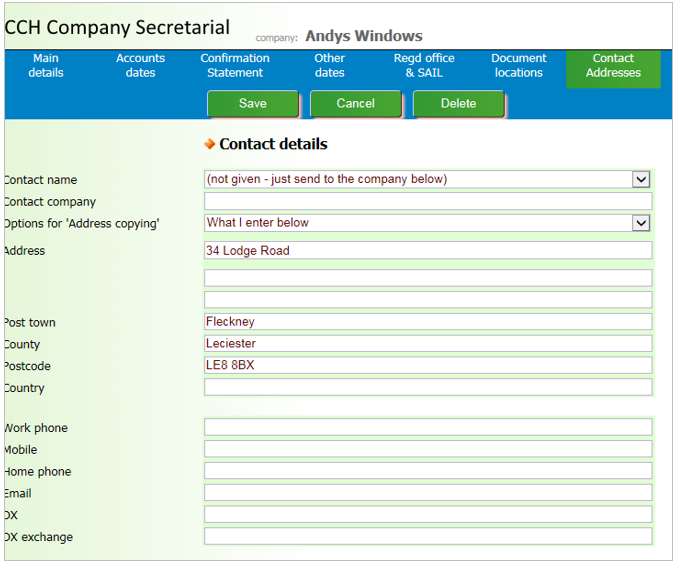
- If you choose this option, you must be aware that all companies that reside in CCH Company Secretarial and have an address within the contact address area will populate the primary address in CCH Central when an update to the record occurs. There is a configuration key available to utilise this option. Please contact CCH Support in order to obtain the key.
Related documents
CCH Company Secretarial Integration 2024.2 : Release Notes
The CCH Company Secretarial Integration 2024.2 Release Notes outline the installation prerequisites via the Central Suite Installer and detail updates regarding compliance with the Economic Crime and Corporate Transparency Act. Starting March 4, 2024, companies must provide a registered email address when filing confirmation statements or incorporating. The registered email will sync with company records in the Company Secretarial module. The document includes a legal disclaimer and copyright notice, emphasizing the confidentiality and proprietary nature of the information contained within.
Synchronise with CCH Central
This document provides a comprehensive guide on setting up synchronization between CCH Company Secretarial and CCH Central. It includes detailed instructions for installing the service, configuring data synchronization, and using various features such as the Data Analyser and contact management. Additionally, it contains sections on resolving error messages and multiple appendices for further reference. Links to specific topics within the guide are also provided for easy navigation.
Installing the Service
This document outlines the steps to install the CCH Company Secretarial service. Users must first acquire a CCH Company Secretarial license before running the CCH Central Suite Installer (CSI). It provides a link for detailed instructions on using the installer and notes that the service can be accessed via the Start menu under Services.
Configuration for CCH Company Secretarial
This document outlines the configuration settings for CCH Company Secretarial and its synchronization with CCH Central. It emphasizes the importance of reviewing and cleaning data before synchronization, using the Data Analyser feature for checking discrepancies. Users can choose between various synchronization methods and must ensure critical fields are populated to prevent data loss. The document also details address configuration, highlighting rules for identity flags, and mentions the new de-linking option for address changes affecting multiple records. Draft contact authorizations and the importance of synchronizing in small batches are also discussed.
Filing forms to companies house
Filing forms to companies house