
Editing Additions and Disposals in Corporation Tax
Additions and Disposals are imported into Corporation Tax from the Fixed Asset Register for tax analysis.
The screen below shows a single Addition that has been imported from Fixed Asset Register.
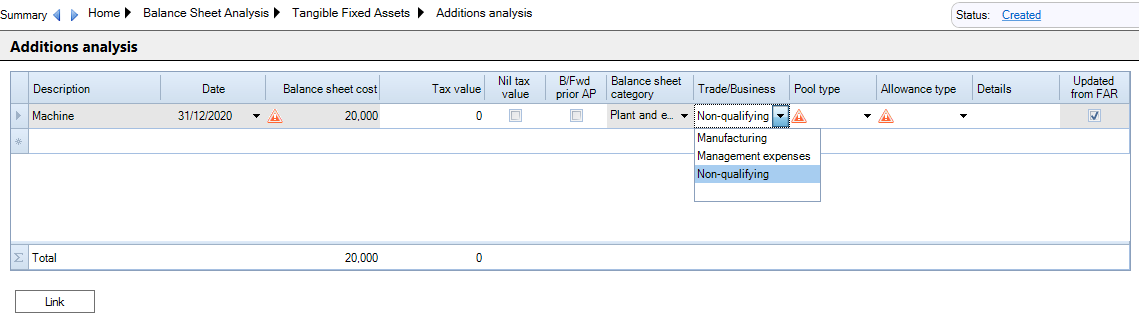
Fields imported from the Fixed Asset Register, such as the asset Description, Date and Balance sheet cost are greyed out. To change them you need to update the Fixed Asset Register.
When editing fields in Corporation Tax you need to enter the data and press Tab to move to the next column.
Enter the Tax Value of the addition if different from Balance sheet cost or select if Nil tax value.
The Balance Sheet category comes from the asset's Asset Class.
The Balance Sheet categories default for large companies in the Master Asset Classes. The Balance Sheet categories on the Asset classes need to be edited for small companies.
Select the Trade/Business, Pool Type and Allowance Type
Click the Link button to link all the additions to the Capital Allowances screen and clear Cost is not linked warrning.
The Updated from FAR column indicates that this Addition has been imported from the Fixed Asset Register.
If you make changes in Corporation Tax and then re-import the data from the Fixed Asset Register, your changes are not lost. When the new records are imported, the fields that came from the Fixed Asset Register are updated and your changes are retained.
To edit Fixed Asset Register imported fields un-tick CCH Accounts Production link - Balance sheet for the relevant period of account on the Tax Links screen and select Update from Accounts in the top Ribbon.