
How To
Editing nominal accounts
CCH Trust Accounts
How to edit Nominal Accounts
Once you have set up your client Chart of Accounts based on selections from the Master Chart of Accounts as shown in Section 1, it is possible to edit the Short and Long descriptions for this client only. This will allow the specified Long description account name to be used in the CCH Accounts Production formatter and the Short Description by default in the Nominal Reports (Trial Balance, Nominal Ledger etc) within CCH Trust Accounts. There is a checkbox available when printing these reports which will show the Long description instead.
To make these changes:
- Select the Nominal Account you wish to amend from the Client Chart and click Edit..
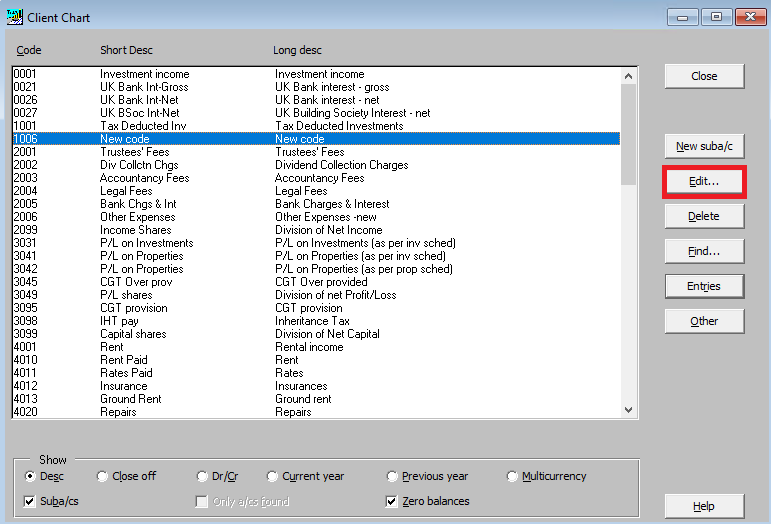
- You can edit the short description, long description and close-off account.
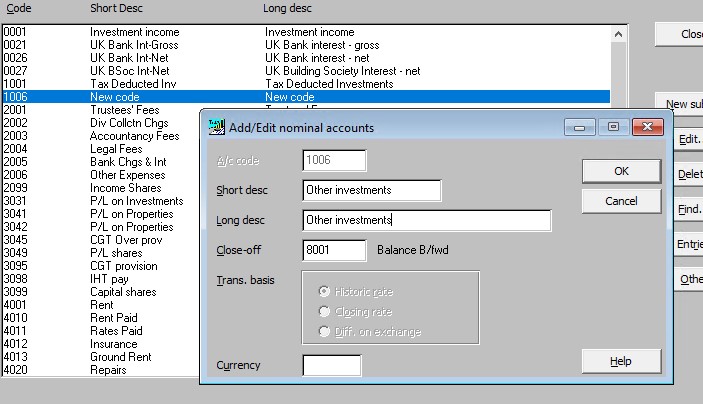
Note: Great care should be used when editing the close-off account as this controls where the balance is transferred to at the year end.
- Click OK when finished.
Related documents
Linking to clients in CCH Central
This document provides instructions on how to link and unlink clients from CCH Central in the CCH Trust Accounts system. To link a client, the user must select the client, click "Edit," then "Link," and choose the appropriate client from Central. Once linked, certain fields become non-editable in Trust Accounts. To unlink a client, the user clicks the "Unlink" button, which restores editability but deletes any accounting periods in Central. Key fields updated from Central include client name, address, and contact details.
Database Parameters
Various features in Trust Accounts are optional. To set up many of these, from the Activities menu select System Management, and then Database Parameters.
Data Parameters
Various features in Trust Accounts are optional. To set up many of these, from the Activities menu select System Management, and then Database Parameters.
Database Parameters
Database Parameters
Passwords
Passwords