
How To
Linking to clients in CCH Central
CCH Trust Accounts
To link a client which has been originally created in CCH Trust Accounts to CCH Central:
- The client will have a client type in the Type column in the Clients screen, without an asterix (*) after it. The asterix indicates that the client is linked to CCH Central.
- Select the client in the Clients screen.
- Click on Edit.
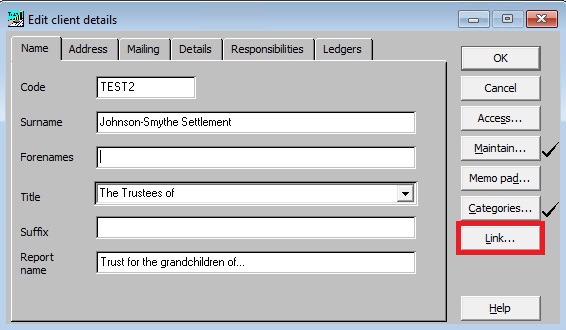
- Click on Link in the Edit client details screen. The message below will then be shown.
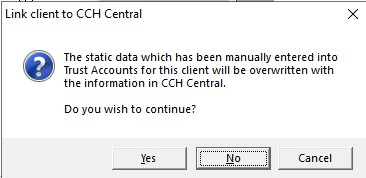
- Click Yes to continue.
- The client list from Central will be shown so that the appropriate client can be selected to be linked.
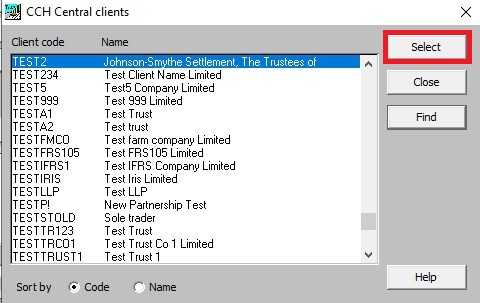
- Click Select to complete the linking process.
- Once selected, some fields in the client are updated from Central and can no longer be edited in Trust Accounts. Fields that are not available in Central can still be edited in Trust Accounts.
The fields that are updated from Central are:
| Tab | Fields linked to Central |
| Name tab | Code, Surname, Forenames, Title and Suffix |
| Address tab | Address, Tel and Fax |
| Mailing tab | Email address and mobile number |
- The Link button in the Edit client details screen has now changed to Unlink.
Unlinking a client from Central
Once a client is linked, the Link button changes to an Unlink button. If the Unlink button is clicked the client is unlinked and all the fields on the client become available for editing again.
Warning: If the Trust Accounts client has accounting periods in Central then they are deleted when the client is unlinked.
Related documents
Database Parameters
Various features in Trust Accounts are optional. To set up many of these, from the Activities menu select System Management, and then Database Parameters.
Data Parameters
Various features in Trust Accounts are optional. To set up many of these, from the Activities menu select System Management, and then Database Parameters.
Database Parameters
Database Parameters
Passwords
Passwords
Other Trust Accounts options that involve CCH Accounts Production
This document outlines the processes for zipping, unzipping, deleting clients, and managing the nominal ledger within CCH Trust Accounts. When zipping or unzipping clients, CCH Central must be active, and users should ensure they check for messages in CCH Trust Accounts. Deleting a client removes associated Accounting Periods, necessitating the opening of CCH Central. Additionally, switching off the nominal ledger results in the deletion of relevant accounting periods. It also mentions the use of Global Accounts Production for handling multiple clients, emphasizing the importance of monitoring both software windows.