Master paragraphs are used in billing to add predefined text to a bill. When you are raising a bill for a client, you can view and select the master paragraphs available for use in the Master Paragraphs window.

Customise invoice using Master Paragraph

  1. In Stage Three of the Billing Wizard or the Bill Paragraphs billing window, click Paragraphs to open the Master Paragraphs window.
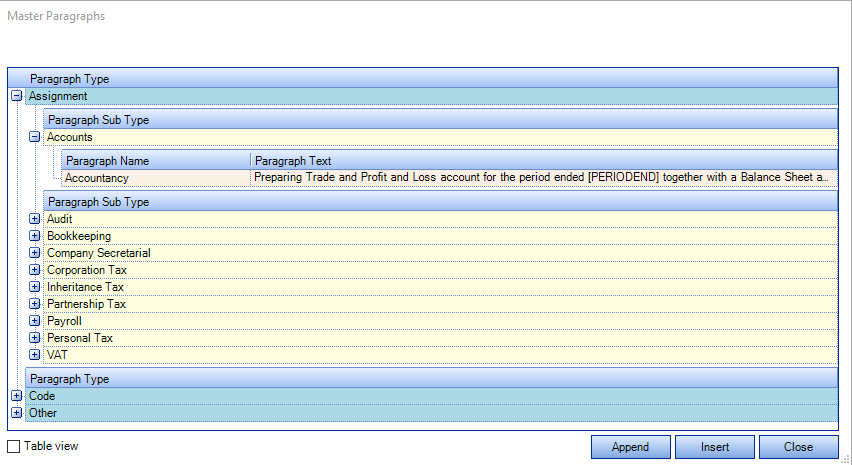
    This window contains all the master paragraphs that have been defined for use in your practice under Paragraph Type.
    Master paragraphs are grouped into Types which can contain a number of related paragraphs. For example, you may have a group of paragraphs under a Type heading of 'Tax', and others that all relate to consultancy work under their own type. Expand the types by clicking on the crosshair icons to view the paragraphs within it.
clipboard_e44c1be81f30bb8e7e15a502005d5b25c.png

  1. In the Master Paragraphs window, click a paragraph to select it and then click Insert or drag it to the billing paragraphs area of the Bill Paragraphs page.
    Like invoice templates, these masters are configured by the system administrator and are a way of customising invoices to different client and practice requirements. Most practices develop their own library of master paragraphs most suited to their own billing requirements.

  2. Alternatively, you can attach paragraphs to specific assignments so when a bill is created for that assignment all the bill content can be added in one step.

    You can:

  • Drag and drop a single master paragraph onto the main area of the page. The paragraph will be added as a new paragraph.

  • Make multiple selections by holding down the [Ctrl] key whilst clicking on the required paragraphs. Each selected paragraph will be added as a new paragraph.

  • Append the content of one or more master paragraphs to an existing paragraph in the draft bill text (without overwriting) by holding the [Shift] key while you drag them to the draft bill.

NOTE

To add new master paragraphs via the Maintenance menu you need Supersuer access rights in the system. See your system administrator if you do not have the required access.

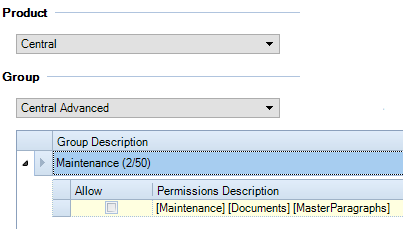
 In order for users to be able to edit the list of Master Paragraphs within File -> Maintenance -> Documents -> Master Paragraphs, a task permission will need to be selected:
clipboard_e814f46e7e34111a692746f936181fe77.png

Related documents

CCH Practice Management 2026.2: Release Notes
Release Notes for CCH Practice Management 2026.2
CCH Practice Management 2026.3: Release Notes
Release Notes for CCH Practice Management 2026.3
CCH Practice Management: enhanced - billing training online (10133815)
This document outlines a 3-hour training course on CCH Practice Management, focusing on the chargeable work process for clients. Participants will learn how to authorize timesheets, expenses, and disbursements, access prebilling reports, and utilize basic billing functionalities. The course is aimed at users involved in the billing process and requires prior completion of CCH Central and CCH Practice Management essentials courses. It will be delivered via an interactive environment called CloudShare. Additional resources such as eLearning courses, videos, and webinars are provided for further learning.
CCH Practice Management: essentials training online (10133814)
This course is designed for staff involved in completing Timesheets, Expenses, and Disbursements within the CCH Practice Management system. It covers the creation and submission processes, as well as utilizing CCH homepages for efficiency. Prerequisites include completed CCH implementations and internal agreement. The training lasts for two hours and is conducted via the interactive CloudShare platform. Topics include job structure, month-end processes, and practical hands-on exercises. Resources such as eLearning, videos, and webinars are also available to enhance learning.
Software and database installation (10091331)
This document outlines the installation process for software and a pre-configured database following an order confirmation. It emphasizes the importance of ensuring that the IT environment meets necessary hardware and software specifications, as well as the role of a Consultant in reviewing infrastructure and advising on deployment options. Key areas covered include SQL revisions, resource allocation for installations, workstation deployment methods, and scheduling installation access rights. Users are encouraged to review a hardware system requirements guide prior to installation discussions.