
Accrued Income
When a fixed interest stock is bought or sold there is an element of interest in the purchase or sale price. For instance, if a bond pays interest twice-yearly on 31st December and 30th June, and a holder sells on 30th November then the price received allows for the fact that there is only one more month to wait until the next interest payment arrives. So, the sale price includes 5 months’ interest. Accrued Income should not be confused with Accrued Interest.
Clients without a Nominal Ledger
If a client does not have a nominal ledger switched on, then accrued income is posted in a different way. Instead of the accrued income amount being a part of the purchase or sale entry, it is a separate entry in its own right. In this case, accrued income is entered using movement codes:
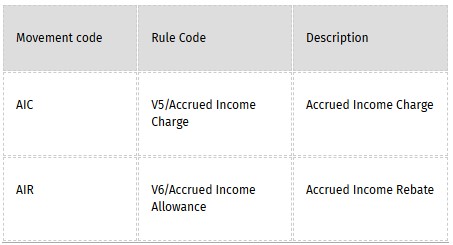
These entries are shown on the Income and Acquisitions Schedule but not on the Investment Schedule. Note that V6 entries should be entered as negative. Also, rule codes V5 and V6 cannot be used when the nominal ledger is switched on. If a nominal ledger is subsequently added to an investment-ledger only client, then the V5 and V6 entries are converted to zero quantity, zero value purchases and sales.
Clients with a Nominal Ledger
Some entities are subject to tax on their accrued income, but are not interested in accrued income for accounting purposes; other entities want to record accrued income for both tax and accounting purposes. In the UK, the tax authorities refer to accrued income as the Accrued Income Scheme. Trust Accounts allows for either treatment. Assuming the nominal ledger is in use, this is set when the investment account for a fixed interest stock is set up:
|
Tax Only |
Tick the Accrued Income Scheme check-box. |
|
Tax and Accounts |
Tick the Accrued Income Scheme check-box and also assign a nominal account to Accrued Income. |
Accrued Income Scheme – Tax Only
When posting Investment Entries for purchases or sales, a window appears for the accrued income amount on the transaction. Once entered, this information can be edited through Details - CGT Details - Accrued Income. The information entered has no effect on either the investment or nominal ledger. However, it does appear on the Income and Acquisitions Schedule, as this report analyses the income according to its tax treatment.
Trust Accounts does not calculate the accrued income amount. There are various calculation methods that can be used such as ‘30 day month’, ‘365 day year’ and ‘US Treasury Stock’. However, in most cases this is not necessary as the amount is usually available on the Contract Note. The Security record has a field for the Accrued Income Calculation method, but currently this is only for memorandum purposes.
Example:
A person buys 1000 units of Treasury 10% Loan Stock cum div for GBP1000 on 06/04/1999. There are two interest periods during the year: 1 January to 30 June and 1 July to 31 December. Consequently, on receiving the stock, the buyer is entitled to an allowance of about GBP26.52.
The postings are as follows:
PUR 06/04/1999 1000 @ GBP1000 - with GBP26.52 entered as an allowance when prompted.
|
Dr |
Cr |
|
Bank |
1000.00 |
|
Investment Cost Account |
1000.00 |
Accrued Income Scheme – Tax and Accounts
In this case, the Accrued Income window appears as before when the purchase or sale is entered. However, this time the amount is posted through the nominal ledger to the account selected at the time of setup. The application automatically gives it a Journal Type of V. An allowance is a debit to the accrued income account and a charge is a credit. The user can see the accrued income in the Investment Account window which details the postings on each investment. Accrued income amounts can also be seen on the Investment Schedule.
Example:
A person buys 1000 units of Treasury 10% Loan Stock cum div for GBP1000 on 06/04/1999 as before.
PUR 06/04/1999 1000 @ GBP1000 - with GBP26.52 entered as an allowance when prompted.
|
Dr |
Cr |
|
Bank |
1000.00 |
|
Investment Cost Account |
973.48 |
|
Accrued Income |
26.52 |
Investment Schedule
The investment schedule only shows accrued income if it was entered on a client with a nominal ledger and the accrued income was recorded for both tax and accounts purposes. Note that in other cases accrued income does not appear, even if the option to Include Accrued Income is ticked.
The investment schedule has two methods of showing accrued income. If Include Accrued Income is ticked then it is shown in the income column(s) which is only appropriate if it is being credited to the Income Account. If Include Accrued Income is not ticked, a separate column can be shown for Accrued Income which can be used whether the Accrued Income is being credited to income or to capital.