In this guide we explain how the process has changed for users of our standard version. Users of our premium version will receive a full AI Guide. Please refer to your service provider should you wish to upgrade to the AI version.

Information! AI-generated capability in PrivIQ’s risk assessments extended to compliance checklists. A slightly different way in which we add or edit custom checklists. You can only generate sections using AI if your account is on the premium version. In this guide we explain how the process has changed for users of our standard version. Users of our premium version will receive a full AI Guide. Please refer to your service provider should you wish to upgrade to the AI version.

Adding a section and its sub-sections

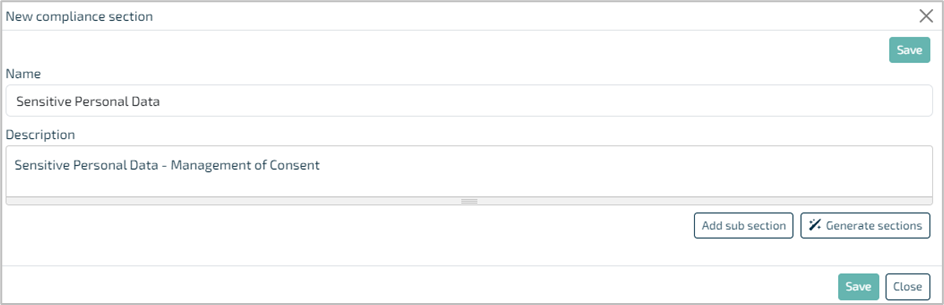
In our example, we’re going to add the main section called ‘Sensitive Personal Data’ and just a single sub-section called ‘Employee Sensitive Personal Data’

  1. Click ‘Add New’, add the name and description of the main section, and click ‘Add sub-section’.
    If you click ‘Generate sections’, then only the ‘Add sub-section’ button will display.
    clipboard_e02ad3536768e5886364a668c55bca811.png
     
  2. Click on the box that says ‘New sub section’
    clipboard_ee1643f873c9a3731bf19128f0f5ed342.png
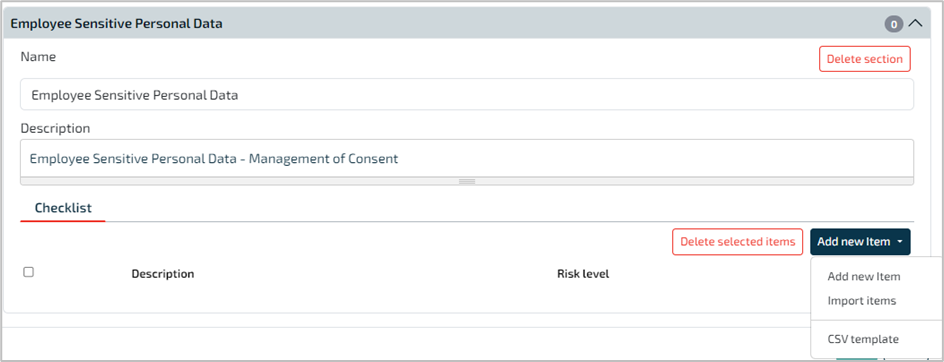
  3. Add the name and description of the sub-section and click ‘Add new item’, and ‘Add new item’ below that.
    (We are adding items directly at this point and not importing items).
    clipboard_e38137f8410f0fddfd72f7212231bff47.png
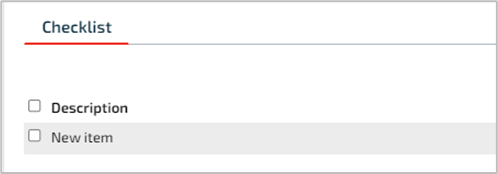
  4. Hover over the line – ‘New item’ – until you see the cursor change to the hand icon clipboard_eff9be328091198eeaad4f850904e9ddb.png, then click.
    clipboard_e919f7599988ccf6927ea87e3acc34797.png
  5. Enter the text for the item, adjust the default risk level *** as required and click on the tick box clipboard_e81b53bf46b592dd4a037b57a5d8e0e35.png.
    clipboard_e72a6ac415217a531a18e38d9a8c73ec1.png

    Important! *** You can only adjust the default risk level here – and not from within the checklist as before.

    This is an improvement in permissions controls – limited to users with access.

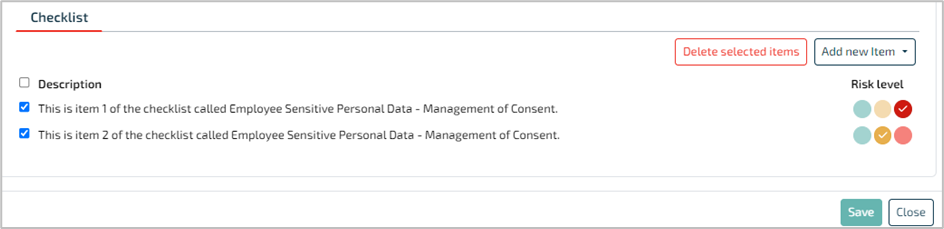
  6. Continue adding as needed by clicking ‘Add new item’. Select those you need to appear in the checklist as indicated below
    – i.e., the white tick in the blue square on the left clipboard_eb5746bf694e456298716400357a820cf.png.
    clipboard_e3c5fc760316856ca3e5d13b1020206c4.png
  7. Most important:Click ‘Save’, otherwise you will lose all of your work. It’s a good idea to Save regularly

  8. When you need to edit a section or sub-section, click on the section or sub-section and then click ‘Edit’
    clipboard_ee53c807d2d5ce88d1b04fef54d2173fa.png

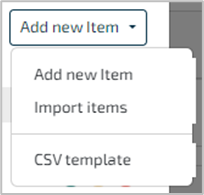
Importing items from your CSV into an existing sub-section works exactly like it did before. You must save them to the sub-section, but you can edit the sub-section should you need to add or remove any of these items.
clipboard_e7ac4aefa227f74c8abf6fd9cd42f23ff.png

Related documents

CCH GDPR Compliance  MFA
The document outlines the implementation of multi-factor authentication (MFA) for users of the CCH GDPR Compliance application to enhance account security. It explains that users must provide two factors for access, specifically a password and a verification code sent via SMS or generated through a time-based one-time password (TOTP) app, such as Google Authenticator or Microsoft Authenticator. Instructions for downloading these apps and setting up SMS verification are provided, along with visual aids for the login process and MFA selection.
Stakeholder training and awareness
The document discusses the importance of staff awareness and compliance in data protection programs within organizations. It highlights the necessity of training employees on relevant policies and providing documentation of their understanding and acceptance. The CCH GDPR Compliance tool is introduced, which allows organizations to distribute policies, track employee receipt and acceptance, and monitor compliance status with visual indicators. It emphasizes the need for a record of training efforts and offers templates for communication, ensuring all employees are informed and compliant.
Simplifying Data Subject Access Requests (DSAR)
This document outlines the rights of individuals regarding their personal data and how organizations can facilitate the exercise of these rights. It emphasizes the importance of allowing easy access to rights through communication channels. The process for handling Data Subject Access Requests (DSAR) is detailed in three steps: receiving and logging requests via a customizable online form, validating requests by confirming the requester's identity, and responding appropriately to the request while ensuring compliance. The document stresses the importance of training staff and maintaining records for accountability and transparency.
Responding to data breaches
This document discusses the importance of effective breach management in compliance with GDPR, highlighting the challenges many organizations face in acknowledging breaches. It introduces CCH GDPR Compliance as a solution, detailing its workflow for logging breaches, managing responses, and assessing incidents. Key features include understanding causes, assembling response teams, risk evaluation, and facilitating communication with supervisory authorities and affected data subjects. The tool also provides downloadable reports and maintains a historical breach log for future learning and prevention efforts.
Ensuring third parties are compliant
This document emphasizes the importance of managing personal data shared with third parties, particularly concerning GDPR compliance. It highlights the necessity for written agreements outlining data processing practices and the need for meticulous logging of data transfers. The document addresses the complexities of sharing data with both processors and controllers, including specific legal obligations when processors are outside the EU. It underscores the distinct legal responsibilities between controllers and processors and recommends mapping these relationships for clarity and compliance. Additionally, it offers tools for generating agreements and recording legal bases for data sharing.