
Clear Down tab
If Perform Clear Down is ticked on the Options tab then a new tab appears with the options to delete old entries or investments. It is rarely used these days as disk space and speed are seldom a problem.
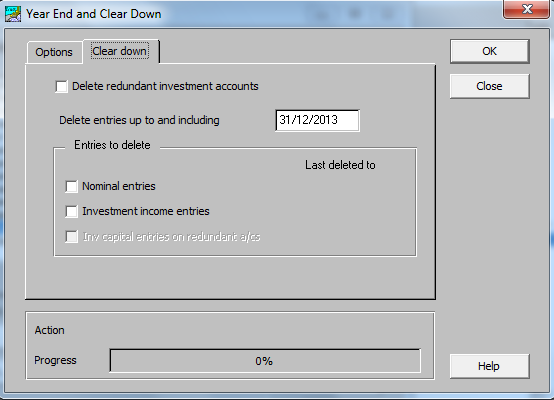
Fields
- Delete redundant investment accounts If ticked, then investment accounts with no entries will be deleted. See also deleting Inv capital entries on redundant investment accounts below.
- Delete entries up to and including This is the date up to which you wish to delete entries. No entries will be deleted beyond this date. Also this date must be before the start of the current financial year. So only prior year entries can be deleted. The entries to delete are specified by the following three check boxes. If none of them are ticked then no entries will be deleted.
- Nominal entries If ticked then nominal entries, i.e. bank receipts and payments and journals, up to the date specified will be deleted.
- Investment income entries If ticked then investment income entries up to the date specified will be deleted. If you wish to Delete redundant investment accounts then this should be ticked.
- Inv capital entries on redundant accounts This check box is only available if Delete redundant investment accounts is ticked. If ticked, the system deletes the investment capital entries on a holding if:
- The holding was zero at the date specified for the Clear Down.
- There have been no further investment entries since then.
So, loosely speaking, the capital entries will only be deleted if the holding was ‘dead’ on the date specified and is still dead now.
- Last Deleted To Next to these three check boxes is shown the Last Deleted To date. This allows users to see how far back their transactions history goes. It is blank until entries have first been deleted for a client.
Note: These options allow you to keep different types of transactions for different periods of time. For instance, you could delete all old nominal entries at the year end, but keep a history of investment income transactions for three years. To do this, you would select to delete nominal entries at the same time as the year end. Immediately after the year end you would run a Clear Down to delete only investment income entries more than three years old.