
How To
Creating a Tax Bundle
CCH IFirm Personal Tax
Creating a tax bundle
- Select 'Finalise tax return'
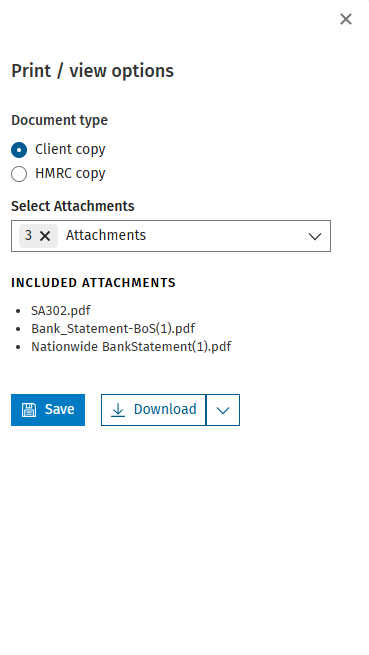
- Click 'Print/view options'
- Select the document type, this would be either 'client copy' or 'HMRC copy'
- You can select which documents make up your tax bundle by clicking on 'Select attachment'
Note: The system will remember your select for the tax year for each document type
- Click 'Save' to preview your tax bundle or select download PDF
- If you use CCH Document Management you can automatically send the tax bundle from CCH iFirm Personal into CCH Document Management in central by selecting download and clicking 'CCH Document Management'

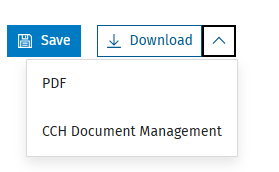
Note: Selecting download to CCH Document Management will save the tax bundle to the correct client, tax year and assignment in CCH Document Management
Related documents
Removing linked Data
The document provides a brief guide on how to remove linked data in the Self Employment form by clicking the 'Unlink' button twice to confirm the action. An accompanying image illustrates the process.
Getting Started with CCH iFirm Personal Tax
This document provides a step-by-step guide for using CCH iFirm Personal Tax via CCH Central. Key prerequisites include having the latest version of CCH Central, necessary user permissions, and .Net 8.0 runtime installed. Users must access the CCH iFirm Console for authentication and synchronization. The process for creating personal tax returns in CCH iFirm is outlined, including selecting the tax year and necessary client details. Additionally, there are instructions for managing user access within Organisation Management, ensuring employees can utilize the software effectively.
Pension Contributions: CCH iFirm Personal Tax
To open the Pension contributions data source, click on Pension contributions from the data sources list.
NIC Adjustments
NIC adjustments are automatically added to the data source list when the Self-employment data source is added to the tax return.
UK dividends - Dividends from UK companies
This document provides instructions for entering dividends from UK companies in a tax management system. Users are guided to access the Dividends section, add company details, including name, description, date, and dividend details. It explains the process for modifying distribution types, adding multiple entries, and saving the information. A summary section is mentioned, which displays the compiled entries at the bottom of the screen.