
How To
UK dividends - Dividends from UK companies
CCH IFirm Personal Tax
Click on Dividends from UK companies from the left panel or from the Self Assessment screen (you can also click Edit/View in the Self Assessment screen).
Click here to learn more about adding data sources.
Add Company
- Type in the company name in the Company name* field.
- Add the description and date disposed if relevant.
Detail
- To add more detail click on the accordion.
- Enter the date paid and quantity.
- By default the distribution type is set to Cash Dividend, to change this click on the drop down.
- Enter the dividend received.
- To add another line, click + Add Row.
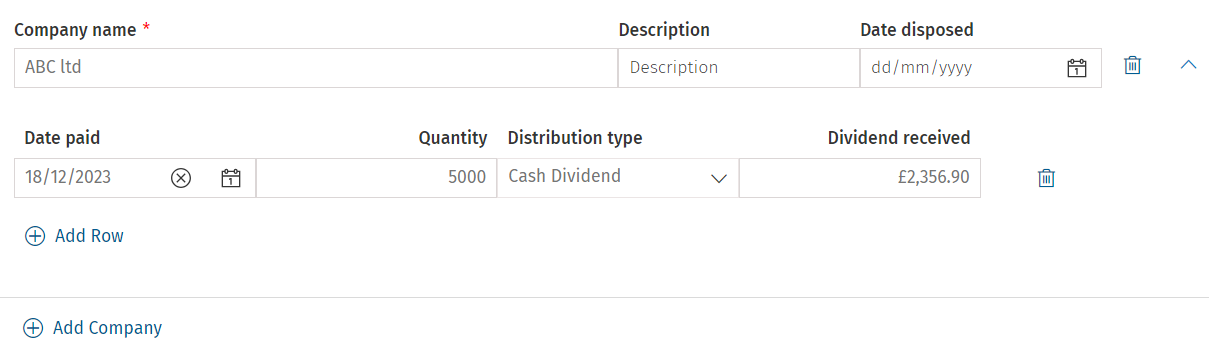
- To add another company click +Add Company.
- Once done, click on the Save icon.
Summary
The summary can be seen at the bottom of the screen.
Related documents
Removing linked Data
The document provides a brief guide on how to remove linked data in the Self Employment form by clicking the 'Unlink' button twice to confirm the action. An accompanying image illustrates the process.
Getting Started with CCH iFirm Personal Tax
This document provides a step-by-step guide for using CCH iFirm Personal Tax via CCH Central. Key prerequisites include having the latest version of CCH Central, necessary user permissions, and .Net 8.0 runtime installed. Users must access the CCH iFirm Console for authentication and synchronization. The process for creating personal tax returns in CCH iFirm is outlined, including selecting the tax year and necessary client details. Additionally, there are instructions for managing user access within Organisation Management, ensuring employees can utilize the software effectively.
Pension Contributions: CCH iFirm Personal Tax
To open the Pension contributions data source, click on Pension contributions from the data sources list.
NIC Adjustments
NIC adjustments are automatically added to the data source list when the Self-employment data source is added to the tax return.
UK Interest - Interest from banks
This document provides instructions for inputting bank interest information in the CCH iFirm Personal Tax system. Users should access the Interest from banks section via the left menu or Self Assessment screen, add bank/lender names and interest amounts, and have the option to add or delete entries. A summary of total interest received is displayed at the bottom of the screen. Users must save their changes by clicking the Save icon in the top right corner. Additional resources for data entry are also available.