
How To
Default accounts in Nominal Client details screen
CCH Trust Accounts
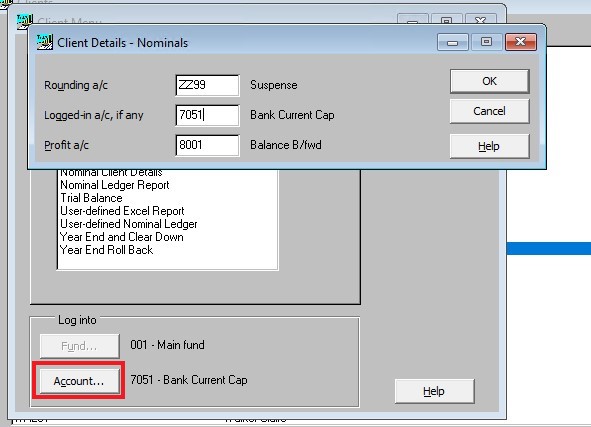
The default nominal account codes for Rounding, the Logged-in account and the profit account are set by selecting the Account button in the Client Menu screen.
The default nominal account codes for Rounding, the Logged-in account and the profit account are set by selecting the Account button in the Client Menu screen.
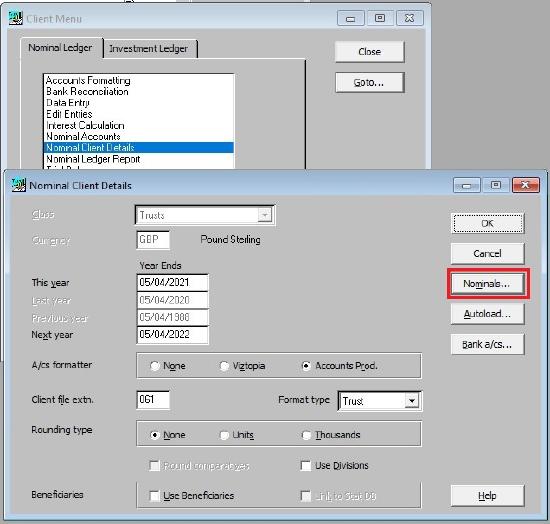
This can also be set by clicking Nominal Account Details in the Client Menu list and then clicking on the Nominals button.
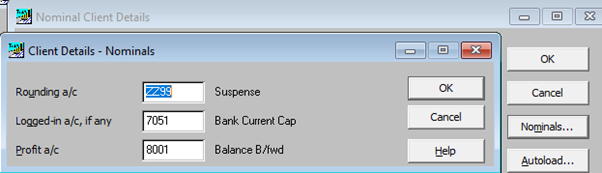
In both cases the following screen will be presented:
|
Rounding a/c |
Any rounding differences are posted to this account. |
|
Logged-in a/c, if any |
The nominal code for the default account. |
|
Profit a/c |
This code represents the account to which profits and losses should be posted. |
Related documents
Linking to clients in CCH Central
This document provides instructions on how to link and unlink clients from CCH Central in the CCH Trust Accounts system. To link a client, the user must select the client, click "Edit," then "Link," and choose the appropriate client from Central. Once linked, certain fields become non-editable in Trust Accounts. To unlink a client, the user clicks the "Unlink" button, which restores editability but deletes any accounting periods in Central. Key fields updated from Central include client name, address, and contact details.
Database Parameters
Various features in Trust Accounts are optional. To set up many of these, from the Activities menu select System Management, and then Database Parameters.
Data Parameters
Various features in Trust Accounts are optional. To set up many of these, from the Activities menu select System Management, and then Database Parameters.
Database Parameters
Database Parameters
Passwords
Passwords