
How To
Export data from CCH Accounts Production to CCH Corporation Tax
CCH Fixed Asset Register
The Fixed Asset Register data is imported into CCH Corporation Tax alongside the CCH Accounts Production data. CCH Accounts Production data must be exported before it can be imported into CCH Corporation Tax. To import Fixed Asset Register data you must export the CCH Accounts Production data first. Otherwise the system will report Nothing to import.
To export the data from CCH Accounts Production go into the relevant Accounting Period in CCH Accounts Production.
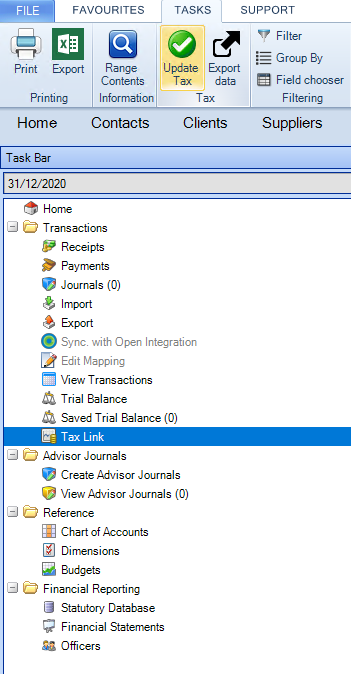
- Select Tax Link in the Task bar.
- Select Update Tax on the Ribbon
- A message Mark the Tax Link data as Draft? appears. This question has no effect when exporting to Corporation Tax. Answer No and click Continue.
- An Update complete message appears.
Related documents
Part Disposals
Part Disposals
Changing Entity Type
Changing Entity Type
Asset Movement
The document outlines the functionality of the Asset Movement screen, detailing how asset transactions are recorded in the Fixed Asset Register, independent of CCH Accounts Production. It describes five types of movements: Cost B/Fwd, Addition, Adjustment, Revaluation, and Disposal, each with specific criteria and purposes. The document also covers the protocol for asset movement dates, especially concerning finalized periods, and discusses the Change of Method movement for altering depreciation methods. Additionally, it includes guidelines on how movements affect nominal accounts and the conditions under which movement deletion is permissible.
Asset Classes
The Asset class section is used to define the ledger accounts which must be used for the posting of the asset transactions and the method of depreciation.
Master Asset Classes: Fixed Asset Register
The document outlines the functionality of Master Asset Classes within the Fixed Asset Register's Set Up screen in CCH Accounts Production. These classes provide default settings for client-level Asset Classes and are integral to the CCH chart of accounts versioning system. While Master Asset Classes cannot typically be edited, users can modify them when creating a new Practice Master Pack. Access to Master Asset Classes is through the Set Up screen or the menu path: File > Maintenance > Accounts > Master Asset Classes.