How to run CCH iFirm AML KYB checks and viewing the report
What are CCH iFirm AML KYB Checks?
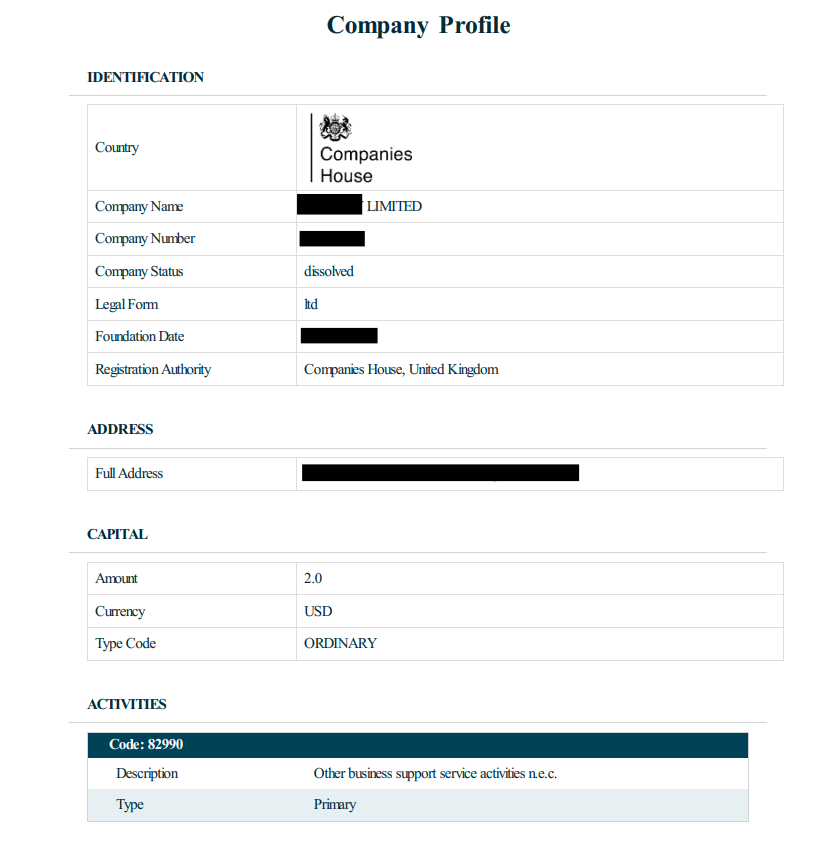
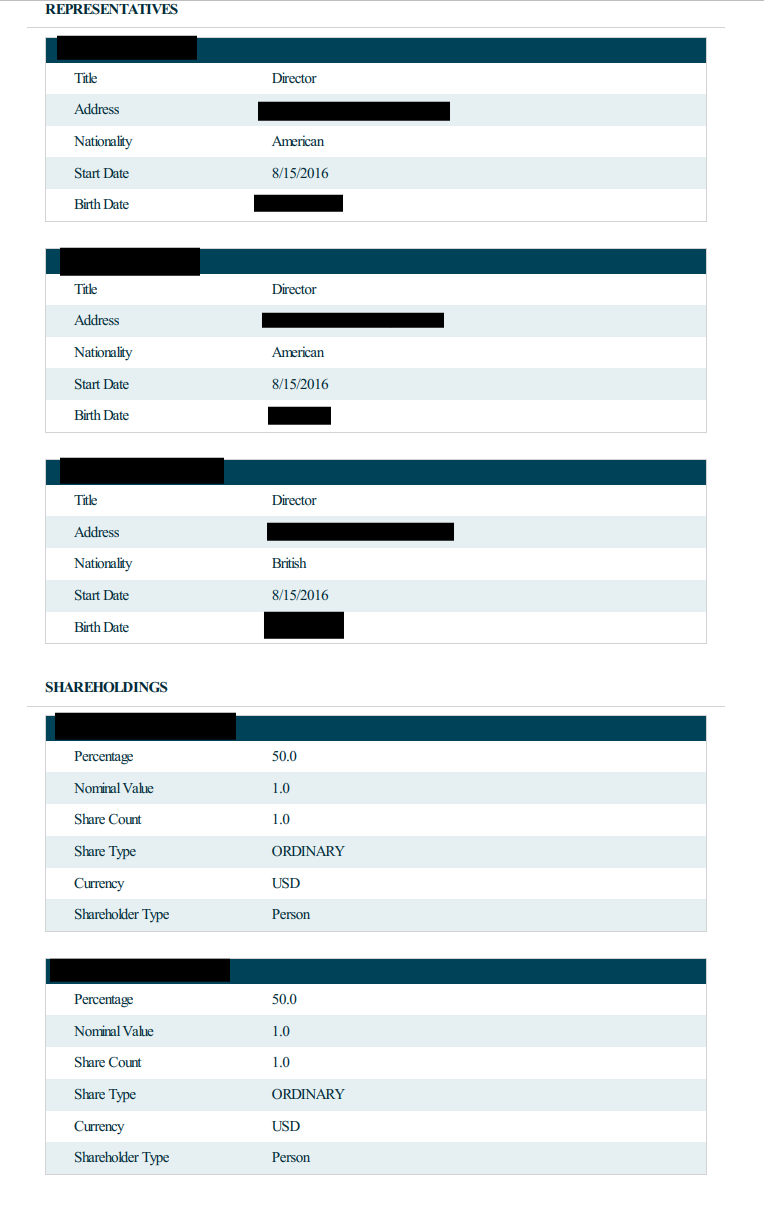
Starting from CCH Central, CCH iFirm AML KYB checks run searches on Limited Companies and LLPs, displaying information on the organisation, directors and shareholdings in the organisation.
These checks can be run in the UK if you have CCH iFirm AML UK KYB checks, or internationally if you have CCH iFirm AML international KYB checks.
The aim is to highlight the stakeholders in a business so you can effectively di your CDD on the right people, as well as identify the relevant UBO's and PCS's
Running the CCH iFirm AML KYB Check
- From within CCH Central find the client or contact that you would like to run an AML check on.
- Open the client or contact and navigate to tasks.
- Click on the CCH iFirm AML button.

After clicking CCH iFirm AML your browser will open a new tab, asking you to log into CCH iFirm with your Wolters Kluwer account.
After you log in, you will see a success message and a new tab will open for CCH iFirm AML.
You will see all the information from CCH Central has now been populated in the iFirm browser window ready for you to run the check.
If the unique Client Registration Number (CRN) number has been entered in the main tab of CCH Central (see below), it will bring this number through and the system will know which business to check. If you haven’t provided a CRN number, then the system will prompt you to select the correct business based on the business name later on.

The country where the business is based can also be selected - not all countries e.g. the USA are included in the list if they do not supply enough useful information as part of the check.
Note: You can see the coverage for KYB further down in this article for those who subscribe to the international checks

If the unique CRN number has not been entered it will display all the possible business names and you will have to find the correct one from the drop down list and select it and then run the check

In either of the above cases once the check has been run the check result will display and you can download the report or view it from the KYB check log by clicking the ellipsis in the status column.


The KYB report will also be available from both the KYB Check log in CCH iFirm AML and the document centre tab in CCH Central.
CCH iFirm AML Interntational KYB Coverage
| Country | Company Registration Details | Company Officials | Shareholders |
| Austria Belgium Brazil China Cyprus Denmark Estonia Finland France French Guiana (FR) French Polynesia (FR) Germany Gibraltar Greece Guadeloupe (FR) Guernsey India Ireland Italy Japan Jersey Latvia Lithuania Luxembourg Macedonia (FYR) Malaysia Malta Martinique (FR) Mayotte (FR) Netherlands New Caledonia (FR) New Zealand Norway Reunion (FR) Saint-Barthelemy (FR) Saint-Pierre-et-Miqueion (FR) Singapore Slovenia Spain Sweden Taiwan United Arab Emirates ( UAE) United Kingdom Wallis and Futuna (FR) | Yes Yes Yes Yes Yes Yes Yes Yes Yes Yes Yes Yes Yes Yes Yes Yes Yes Yes Yes Yes Yes Yes Yes Yes Yes Yes Yes Yes Yes Yes Yes Yes Yes Yes Yes Yes Yes Yes Yes Yes Yes Yes Yes Yes Yes Yes Yes Yes Yes Yes Yes | Yes Yes Yes Yes Yes Yes Yes Yes Yes Yes Yes Yes Yes Yes No Yes Yes No Yes Yes Yes Yes Yes No Yes Yes Yes Yes Yes Yes Yes Yes Yes Yes Yes Yes Yes Yes Yes Yes Yes Yes Yes Yes Yes Yes No Yes Yes Yes Yes | Yes No Yes Yes No Yes Yes No No Yes Yes Yes Yes Yes No Yes Yes No No Yes Yes Yes Yes No No No No No No Yes No Yes Yes Yes Yes Yes Yes No Yes Yes Yes Yes No No No No No Yes Yes Yes Yes |
Example the KYB Report
Below you will see a real KYB report from a business, here we have blanked out some personal information.