
Asset Class
The Asset Class screen lists the assets that make up the Asset Class and a shows a Reconciliation with the nominal ledger balances. The screen has two sections.
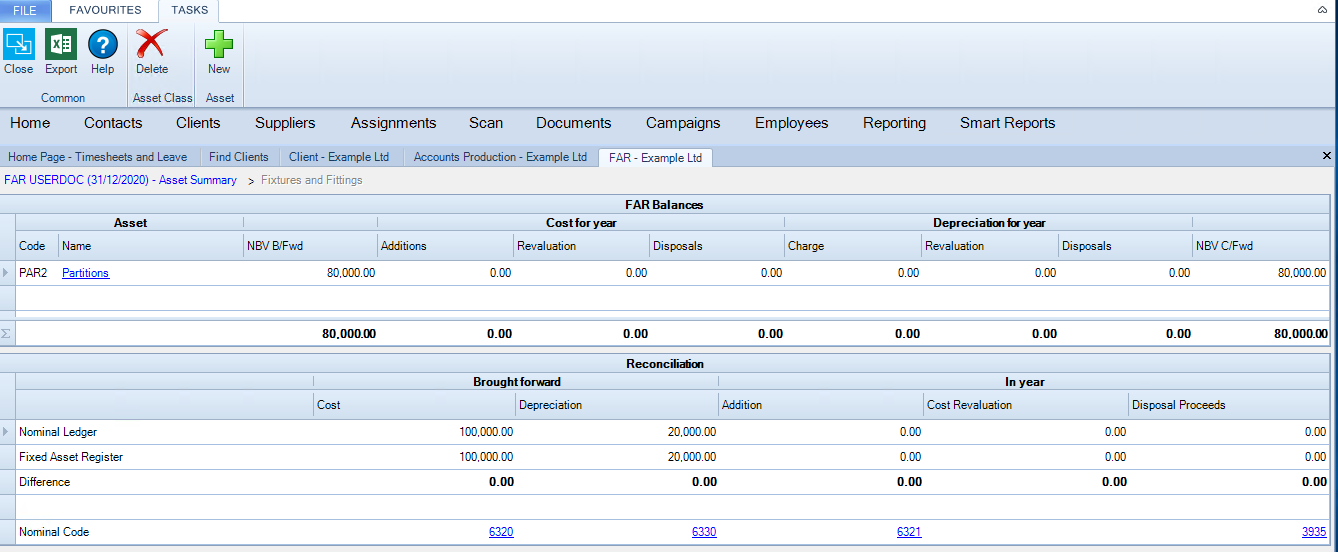
The FAR Balances section occupies the top half of the screen and lists the assets in the Asset Class.
Code and Name display the code and description of the Asset, e.g. FF00001 Boardroom chairs. Click on the Asset to see more detail.
The remaining columns show the balances similar to those for the Asset Summary.
Reconciliation
The purpose of the Reconciliation is to show whether the nominal account balances agree with the balances on the Fixed Asset Register.
There are two main reasons why these accounts might not reconcile:
- If you choose not to analyse a CCH Accounts Production entry in the FAR immediately.
- If you go into the Fixed Asset Register directly and post a FAR entry with no matching entry on the nominal ledger.
It is also possible that other nominal accounts will not match the Fixed Asset Register, e.g. the Depreciation Charge P&L account, but the Reconciliation does not check these. See FAQ.
Nominal Ledger This is the balance on the nominal account, except for the last column, Disposal Proceeds. The Nominal Ledger figure for Disposal Proceeds shows the total of the amounts posted manually to the P/L on Disposal account - these are assumed to be the Disposal Proceeds. Amounts posted by the Fixed Asset Register automatically are excluded, i.e. the cost and depreciation eliminated on disposal.
Fixed Asset Register These are the FAR balances corresponding to these five accounts. The Additions balance includes both Additions and Adjustment Movements posted during the year. Usually the Fixed Asset Register balances on this row agree with those shown above in the FAR Balances section of the screen. But if two or more Asset Classes share the same nominal account, e.g. for the P/L on Disposal, then the Reconciliation shows the total balance for all the Asset Classes that use it, not just for the one Asset Class shown in the FAR Balances section.
Difference shows the unreconciled amount. Once all differences are zero then Agrees with AP is Yes on the Asset Summary screen.
Nominal Code is the nominal code for the balance shown. You can drill into the nominal code to see the underlying nominal ledger entries.
Ribbon
Export Export the Asset Class to Excel, from where it can be printed if required.
Delete Asset Class An Asset Class can only be deleted if it contains no assets.
New Asset Creates a new asset.