
How To
Notes
CCH Trust Accounts
In Accounts Production there is no fundamental difference between a note and a page. The Format code for a Page usually begins “page” and the Format code for a note usually starts “note”, but this is just a convention and is not mandatory. The only real difference is in the Page Settings. There are two relevant settings.
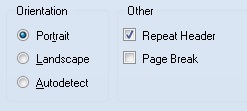
- Repeat Header If a page has Repeat Header ticked the Header tab disappears from Page Settings and the headers used come from the previous page or note. Normal accounts pages each have their own page headings and this is unticked. Notes have it ticked as they all share the page heading, “Notes to the Accounts”.
- Page Break If ticked then a page break is performed before printing the page starts. Normal accounts pages have this ticked; notes have this unticked.
Related
Related documents
Linking to clients in CCH Central
This document provides instructions on how to link and unlink clients from CCH Central in the CCH Trust Accounts system. To link a client, the user must select the client, click "Edit," then "Link," and choose the appropriate client from Central. Once linked, certain fields become non-editable in Trust Accounts. To unlink a client, the user clicks the "Unlink" button, which restores editability but deletes any accounting periods in Central. Key fields updated from Central include client name, address, and contact details.
Database Parameters
Various features in Trust Accounts are optional. To set up many of these, from the Activities menu select System Management, and then Database Parameters.
Data Parameters
Various features in Trust Accounts are optional. To set up many of these, from the Activities menu select System Management, and then Database Parameters.
Database Parameters
Database Parameters
Passwords
Passwords