
How To
Options tab
CCH Trust Accounts
The Year End and Clear Down screen appears as follows with the Options tab displayed.
Fields
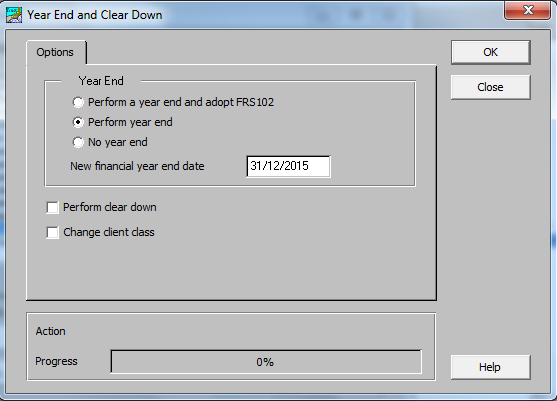
- Year End The options are:
- Perform a year end and adopt FRS102 This option is only available for clients with a Format Type of Ltd Company, Charity (Uninc) or Charity (Incorp). This option performs a normal year end and also changes the Format Type to Ltd (FRS102) or Charity (FRS102). If selected, the Change Client Class tab appears with the New class and the Mapping File preselected.
- Perform year end This is the default option and performs a normal year end.
- No year end This option is used if you only want to Perform a Clear Down or Change Client Class without running a year end.
- New financial year end date Defaults to one year past the current financial year end date. It is not available if No year end is selected.
- Perform clear down This option displays the Clear Down tab where the options to delete old entries or investments are made.
- Change client class This option displays the Change Client Class tab where the options to select a new client class are made.
Related documents
Linking to clients in CCH Central
This document provides instructions on how to link and unlink clients from CCH Central in the CCH Trust Accounts system. To link a client, the user must select the client, click "Edit," then "Link," and choose the appropriate client from Central. Once linked, certain fields become non-editable in Trust Accounts. To unlink a client, the user clicks the "Unlink" button, which restores editability but deletes any accounting periods in Central. Key fields updated from Central include client name, address, and contact details.
Database Parameters
Various features in Trust Accounts are optional. To set up many of these, from the Activities menu select System Management, and then Database Parameters.
Data Parameters
Various features in Trust Accounts are optional. To set up many of these, from the Activities menu select System Management, and then Database Parameters.
Database Parameters
Database Parameters
Passwords
Passwords