
Setting up CCH Central
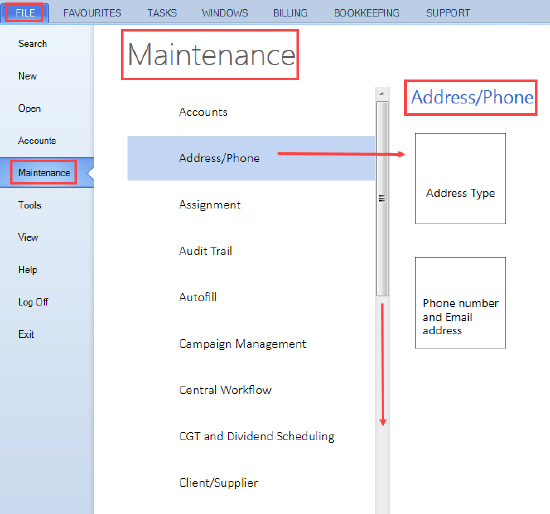
From the main menu File you find the Maintenance area that allows you to configure and maintain the system to best fit how your practice works.
Overview
Under the Maintenance area there are menus which are listed in alphabetical order i.e. Accounts, Address/Phone, etc.
Each maintenance menu has submenus which are listed in the form of tiles on the right hand side of the screen i.e. click on Address/Phone displays a tile for each of its submenus Address Type and Phone number and Email address.
Scroll down the bar between the menus and submenus of the maintenance area for more options.
Set up CCH Central
You can configure CCH Central to:
- represent the structure of the practice
- extend the functionality of the application
- connect to other CCH applications
Configuring the application is essential for:
- providing the correct settings to enable employees to carry out work
- keeping the application secure so that settings are not inadvertently changed
- launching CCH compliant applications
Maintaining CCH Central
The system administrator is responsible for configuring and maintaining the application so that:
- recorded information is structured correctly and useful to the practice
- linked applications launch and operate correctly.
Configuring and maintaining the application takes place from the File Menu>Maintenance and covers such areas as:
- the practice structure — companies, offices, departments, centres, partners
- employee categories, and leave types
- security groups, security permissions and adding employees to a security group
- custom fields (extra fields)
- alias types and address, phone and email types
- document creation settings
All information created and maintained under the Maintenance menu has an impact on the operating system of the application. As a result, if there is any doubt as to what needs to be done, please contact a CCH Consultant.
Note: It is recommended that not everyone in the practice has access to the maintenance area, because any changes made have an impact on the operating system of the application.