1. Within the Accounting period, click on Sync. With Open Integration

clipboard_e2f70f75dda03780203ec3f58e36cb3b0.png

Please note: to demonstrate this process Xero Bookkeeping is used as an example throughout this guide

You can choose to synchronise transactions or the trial balance, however, the process is the same for both options.

2. Select either transactions or the trial balance as shown in the screenshot above

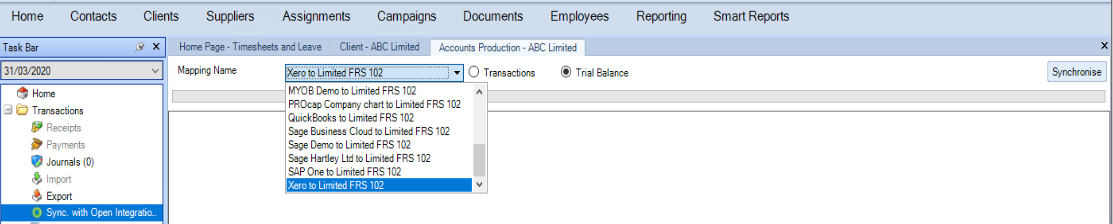
  • The first time the data is synchronised into CCH Accounts Production the mapping will default to none, this is because if you have created your own bespoke chart within Xero which uses the same codes as CCH Accounts Production, then no mapping is required.
  • If you want to select for example Xero Limited to FRS 102 or a bespoke client mapping, then this can be done by clicking on the down arrow next to the mapping name.
clipboard_e33a027dc3198f1092c61bb423a58febf.png

3. Click on Synchronise  

clipboard_e3b5d31b8412d29e0a4c2f2257667de92.png

The following message is displayed:

4. Click on yes


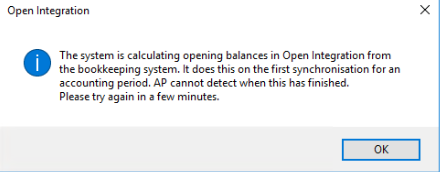
The following message is displayed:
clipboard_e3c7a9bf373480d2868af3ada329e2e5f.png

Note: please be aware that switching between transactions or trial balance will remove all transactional history.

5.Click on OK

6. Click on  Synchronise

clipboard_eb159a243b304ab09c44b35387acdc042.png

7. If prompted, select the relevant nominal code/codes to be mapped

8. Once all codes are mapped click on OK

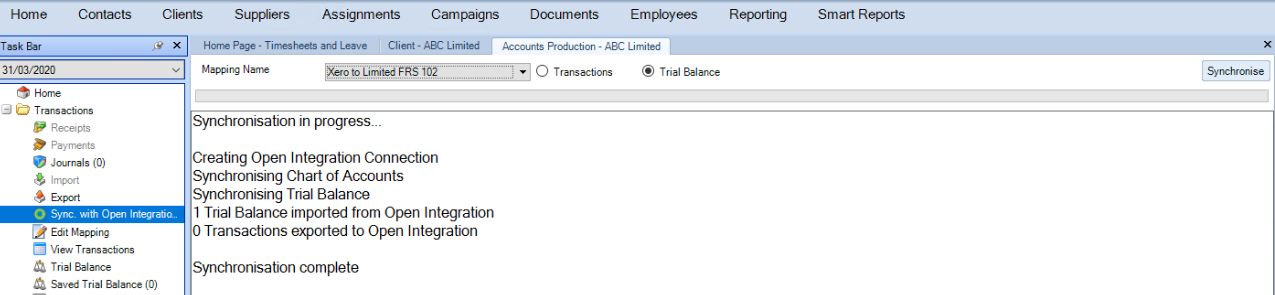
The following will be displayed: 
clipboard_e1f8b8714dd9ae2750eb9600ac6bb5277.png

Please note: For more detail on working with mappings refer to Edit Client Mapping

Before checking the Trial Balance or Transactions, make sure the synchronisation is complete, otherwise, the following message is displayed.

9. Review the trial balance

Please note: Once the data has been synchronised, transactions within CCH Account Production cannot be edited.  Either post a journal in the bookkeeping product or an advisor journal within CCH Accounts Production to make changes to existing transactions.

Related documents

CCH Accounts Production/iXBRL essentials training online (10133804)/(10133819)
This document outlines a course on using CCH Accounts Production software, aimed at helping new users efficiently produce statutory accounts. The course includes 1 x 2 hour session and 1 x 3 hour session focusing on practical skills such as setting up accounting periods, importing trial balances, and navigating the software. It is designed for all employees involved in preparing statutory accounts. Training is conducted in an interactive environment called CloudShare, with additional resources available online for further learning and support.
CCH Accounts Production: essentials training online (10133819)
This document outlines a course on using CCH Accounts Production software, aimed at helping new users efficiently produce statutory accounts. The course includes two 2-hour sessions focusing on practical skills such as setting up accounting periods, importing trial balances, and navigating the software. It is designed for all employees involved in preparing statutory accounts. Training is conducted in an interactive environment called CloudShare, with additional resources available online for further learning and support.
CCH Accounts Production 2026.3 Hotfix: Release Notes
Release Notes for CCH Accounts Production 2026.3 Hotfix
CCH Accounts Production 2026.3: Release Notes
Release Notes for CCH Accounts Production 2026.3
CCH Accounts Production 2026.2: Release Notes
Release Notes for CCH Accounts Production 2026.2
