
Task Permissions: Reference
Task Permissions are used by system administrators to control which users have access to which functions. The Fixed Asset Register Task Permissions are accessed via File > Maintenance > Security > Task Permissions.
Set the Product to Accounts Production.
The Group represents the Security Group in Central, a set of all the permissions required by Employees performing a particular role.
As well as the default security groups, more can be added via File > Maintenance > Security > Security Group Maintenance.
A Security Group such as Tax operator not only includes permissions relating to Personal Tax. It includes permissions for all products. In particular, the Tax operator Security Group includes some permissions for Central, as a tax operator would need some of these.
An Employee who performs multiple roles may be in more than one Security Group. If an Employee has both Accounts Operator permissions and Tax Operator permissions, they are allowed to perform the functions that are enabled in either Security Group.
Employees are allocated to Security Groups by opening the Employee and selecting the Security Groups tab.
Task Permissions are categorised by Group Description.
For the Product CCH Accounts Production, the available Group Descriptions are Business Type, Client, Maintenance, OneClick and Other.
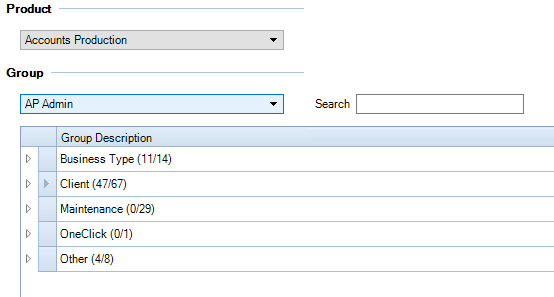
The Fixed Asset permissions are located under the Group Description Client.
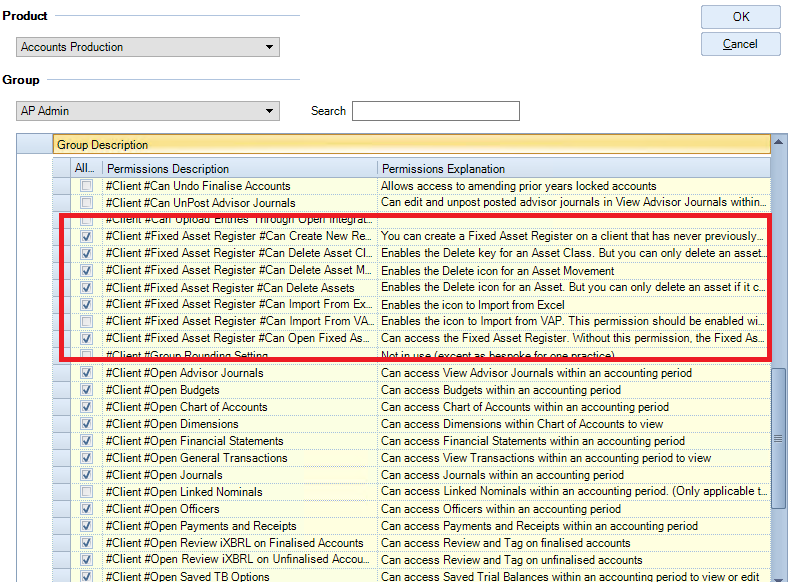
Task Permissions are identified by a Permission Description such as #Client #Fixed Asset Register #Can Delete Assets.
A further Permission is located under the Group Description Maintenance, #Maintenance #Open Master Asset Class
For the Fixed Asset Register, the following permissions are available:
|
Permission Name |
Description |
|
#Maintenance #Open Master Asset Class |
You can open the Master Asset Classes screen to view or edit the Master Asset Classes. (Master Asset Classes cannot be edited if they belong to a published Masterpack.) |
|
#Client #Fixed Asset Register #Can Open Fixed Asset Register |
You can access the Fixed Asset Register. Without this permission, the Fixed Asset Register icon is disabled. |
|
#Client #Fixed Asset Register #Can Create New Register |
You can create a Fixed Asset Register on a client that has never previously had one. You do this by clicking the Fixed Asset Register icon in Accounts Production and selecting the initial defaults such as “Generate Asset Codes Automatically?” |
|
#Client #Fixed Asset Register #Can Import From Excel |
Enables the icon to Import from Excel. |
|
#Client #Fixed Asset Register #Can Import From VAP |
Enables the icon to Import from VAP. This permission should be enabled with caution (see Notes below). |
|
#Client #Fixed Asset Register #Can Delete Asset Movements |
Enables the Delete icon for an Asset Movement. |
|
#Client #Fixed Asset Register #Can Delete Assets |
Enables the Delete icon for an Asset. But you can only delete an asset if it contains no asset movements. |
|
#Client #Fixed Asset Register #Can Delete Asset Classes |
Enables the Delete key for an Asset Class. But you can only delete an asset class if it contains no assets. |
All the Task Permissions are under the Client Group Description apart from the first one which is under Maintenance because it is accessed through the Maintenance menu.
If importing from VAP on a FAR client that contains data, then all the existing FAR data for that client is deleted (after the user is warned). This setting allows a user to delete all the data on a FAR client.