
Tax return other information
NOTE: The Tax return other information section is automatically added in the data source list. It holds the data required for Page 1 of the tax return and the tax calculation.
- To access the Tax return information section, click on Tax return other information in the left menu or on the Self Assessment page.
Page 1 tab
Employer reference
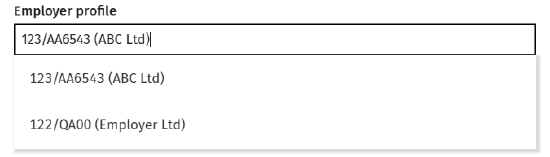
The list of available employer reference(s) comes from the employment data entered for the tax year.
-
To select the employer reference, click in the Employer profile field then
Client address
To use a different address than the one in the clients profile, click on the 'Use default' slider - the address boxes will activate allowing you to type in.
HMRC address
To use a different address than the one in the clients profile, type the address in this section.
Overwriting the client or HMRC address will only apply to the selected tax year.
Additional tabs
Foreign - in this tab, tick if Foreign tax credit relief is to be overriden then enter the override amount.
Agent - in this tab, add the Tax adviser details.
Additional details - in this tab you can set the taxpayer status and set other details suchs as if the tax return contains provisional figures.
Student and postgraduate loans - in this tab select the Student loan plan type and if the taxpayer is liable to make Postgraduate loan repayments.
Declaration - in this tab add the Signatory details.