
How To
The Nominal Ledger report
CCH Trust Accounts
How to produce a report of Nominal Ledger accounts and transactions
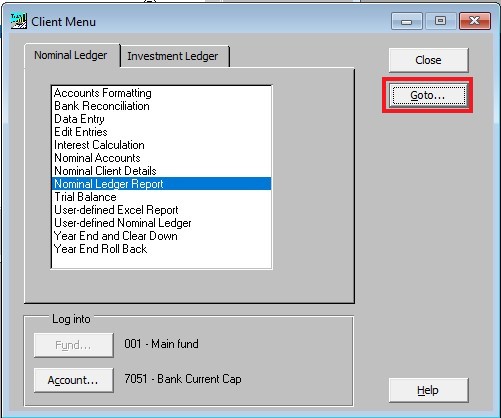
A report of Nominal Ledger accounts and transactions can be produced by clicking on Nominal Ledger Report or highlighting Nominal Ledger Report and clicking the Goto button in the Client Menu:
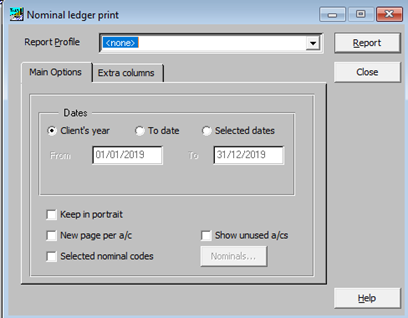
If additional Report Profiles have been defined choose an appropriate one, otherwise leave as <none>.
On the Main Options Tab:
- select the relevant dates for the report
- whether to keep the report in Portrait only
- whether a new page is to be generated for each Nominal Accounts
- whether you wish to select specific Nominal Codes only
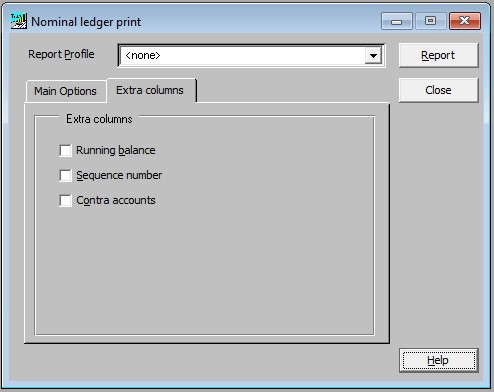
On the Extra columns tab:
- Decide whether a running balance is required.
- Whether system generated sequence numbers are needed.
- Whether contra accounts (showing the code and desciptions of the other half of the Nominal Account entry) are to be shown.
When ready, click on Report to view and/or print.
Related documents
Linking to clients in CCH Central
This document provides instructions on how to link and unlink clients from CCH Central in the CCH Trust Accounts system. To link a client, the user must select the client, click "Edit," then "Link," and choose the appropriate client from Central. Once linked, certain fields become non-editable in Trust Accounts. To unlink a client, the user clicks the "Unlink" button, which restores editability but deletes any accounting periods in Central. Key fields updated from Central include client name, address, and contact details.
Database Parameters
Various features in Trust Accounts are optional. To set up many of these, from the Activities menu select System Management, and then Database Parameters.
Data Parameters
Various features in Trust Accounts are optional. To set up many of these, from the Activities menu select System Management, and then Database Parameters.
Database Parameters
Database Parameters
Passwords
Passwords