
How To
X Installing CCH Trust Accounts 2020.1
CCH Trust Accounts
A full connection string is not required
If you do not need to use a full connection string to connect to CCH Trust Accounts or CCH Central, then you can just install CCH Trust Accounts in the usual way, and Transaction Reporter if you use it (or if you use Excel Reports), and skip the remainder of this section.
A full connection string is required - Installing extra products and modules
If you do wish to use a full connection string, you may need to install other optional modules to recognise the full connection string:
- S6RDBOM – This is required if you use the link from CCH Trust Accounts to CCH Personal Tax. In this case, you need to reinstall UKTax.S6RDBOM.Setup.exe. This Setup file is found in the Central Deploy folder and needs to be run on each workstation that will be used to import CCH Trust Accounts data into CCH Personal Tax.
- The Telekurs software – Reinstalling the Telekurs software is required if you use the Telekurs data feed. The Telekurs software is usually installed on a single workstation that is used to run the Telekurs feed.
- Transaction Reporter – Reinstalling Transaction Reporter is required if you use either Transaction Reporter or Excel Reports. The same install covers both modules. It needs to be installed on any workstation that is used to run Transaction Reporter or Excel Reports.
Note
- Although the PerTAX DAL is used to communicate with SQL Server, it does not need to be reinstalled.
- It is possible for users to make a mistake and omit one of the above installs. Annoyingly, there is a good chance that the system will still work. This is because connecting to SQL Server is fairly fault-tolerant and accepts many of the invalid connection strings which are generated by mismatched releases. However, users should not skip any of these installs as the results are unpredictable.
Installing the Microsoft OLE DB Driver for SQL Server (MSOLEDBSQL)
If you are planning to use the MSOLEDBSQL driver then you need to download it from Microsoft and install it on every workstation that is going to use MSOLEDBSQL in its connection string to CCH Trust Accounts or in the connection string from CCH Trust Accounts to CCH Central.
The download for this driver can be found here.
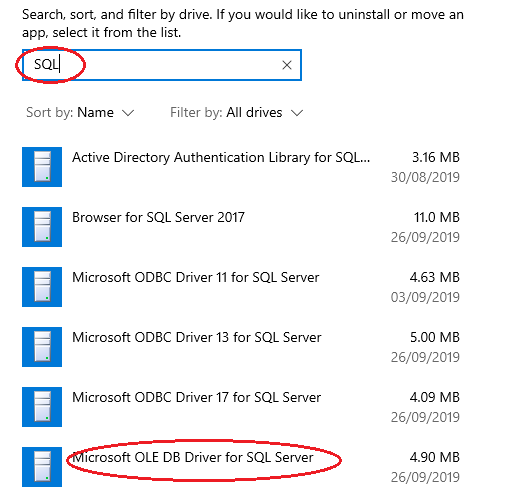
- You can see if a workstation has the “Microsoft OLE DB Driver for SQL Server” installed by looking in Settings > Apps and Features and filtering for SQL as shown below:
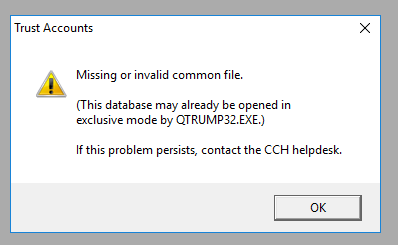
- If you do not install the “Microsoft OLE DB Driver for SQL Server” and you have used MSOLEDBSQL in the CCH Trust Accounts connection string then you see the following error message when you try to go into CCH Trust Accounts. This message means that CCH Trust Accounts cannot communicate with the SQL CCH Trust Accounts database.
Related documents
Linking to clients in CCH Central
This document provides instructions on how to link and unlink clients from CCH Central in the CCH Trust Accounts system. To link a client, the user must select the client, click "Edit," then "Link," and choose the appropriate client from Central. Once linked, certain fields become non-editable in Trust Accounts. To unlink a client, the user clicks the "Unlink" button, which restores editability but deletes any accounting periods in Central. Key fields updated from Central include client name, address, and contact details.
Database Parameters
Various features in Trust Accounts are optional. To set up many of these, from the Activities menu select System Management, and then Database Parameters.
Data Parameters
Various features in Trust Accounts are optional. To set up many of these, from the Activities menu select System Management, and then Database Parameters.
Database Parameters
Database Parameters
Passwords
Passwords