This screen allows you to view and maintain Advisor journals: unpost, repost, edit, delete and view reports.

Viewing posted or unposted Advisor Journals

Select the View Advisor Journals screen from the task bar list to the left of the screen.

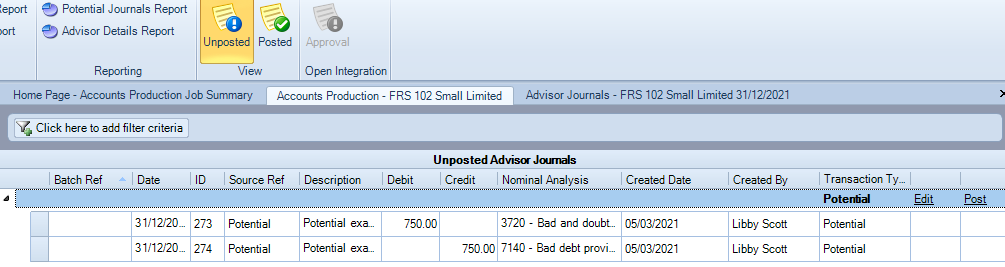
A grid appears showing any advisor journals for the dataset. The Unposted and Posted toggle buttons on the ribbon allows you to filter the advisor journal view.

By default, the Unposted option is selected.

Accounts_Production_Journals-and-Advisor-Journals_View-Journals_1.png

Accounts_Production_Journals-and-Advisor-Journals_View-Journals_2.png

Editing, unposting and posting 

The View Advisor journals grid allows you to edit unposted or posted advisor journals and to post or unpost these journals.  The final column “Approved” is for users of CCH OneClick Open Integration.

Within the Posted view:

  • The Edit hyperlink allows you to edit the posted advisor journal.  Editing will automatically unpost the advisor journal.
  • The Unpost hyperlink allows you to unpost a posted advisor journal.

Within the Unposted view:

  • The Post hyperlink appears next to items that have not been posted.

Note: The Post link is disabled when a journal does not balance, correct the journal entry to balance and post.

View Advisor Journal Reports

There are four reports available on this screen:

  1. Adjusting Journals Report
  2. Reclassification Report
  3. Potential Journals Report
  4. Advisor Details Report

Adjusting Journals Report

This report shows the profit figure per the draft accounts and lists all adjusting journals to give a  revised profit figure (results per financial statement).  When you run this report you will be asked if you wish to show external codes, if you choose Yes the codes will be displayed where appropriate, if there is more than one code <Multi> will be displayed.

Accounts_Production_Journals-and-Advisor-Journals_View-Journals_3.png

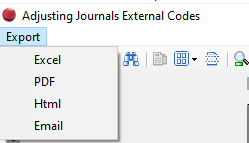
By clicking on the Export button you are able to export to Excel, PDF, Html and Email.
Accounts_Production_Journals-and-Advisor-Journals_View-Journals_4.png

Reclassification Report

This report lists any journals identified as reclassification journals, there is no profit reconciliation as there will be no effect on profit.

Accounts_Production_Journals-and-Advisor-Journals_View-Journals_4.png

Potential Journals Report

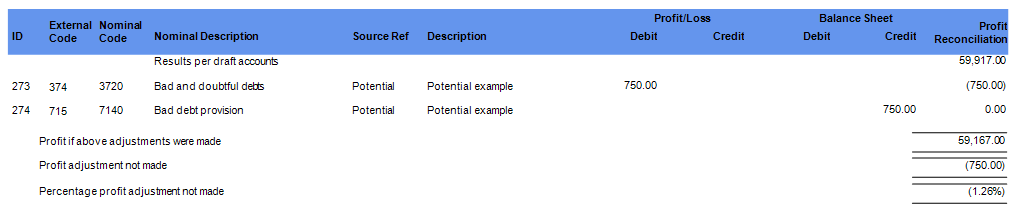
The potential journal report will display any unposted, in other words potential journals and the effect upon profit.  The profit figure will include any adjusting journals.
Accounts_Production_Journals-and-Advisor-Journals_View-Journals_5.png

If we started with a profit figure of £58,417, posted an adjusting journal of £1,500 to give a revised profit of £59,917, this will be the starting figure on the potential journal report. 

The report will then list all potential journals.  If we wish to post these journals we should change the journal type to Adjusting, for example, otherwise although the journal will be in the accounts we will not see those transactions on the Adjusting journal report. 

Note: The potential report will not show any posted journals as it is intended only for unposted journals to show the potential effect upon profit.
Accounts_Production_Journals-and-Advisor-Journals_View-Journals_6.png

Advisor Details Report

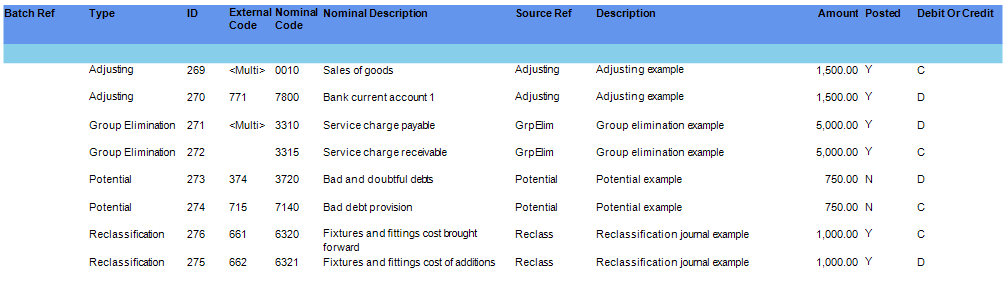
This report list all transactions whether they have been posted or not.
Accounts_Production_Journals-and-Advisor-Journals_View-Journals_7.png

Related documents

Financial statements - all entities
This document provides a comprehensive overview of financial statement management within a CCH entity. It details functionalities such as searching, filtering, and reordering pages and notes. Users can validate entries, generate print options, and customize the inclusion of specific pages. It outlines features for previewing and downloading financial statements in various formats, and includes management and lead schedules relevant to the entity. Additionally, it describes options for displaying draft messages and exporting documents to different formats. Overall, it serves as a guide for efficiently managing financial statements.
Statutory Database Access and Navigation
The document provides instructions for accessing and navigating the statutory database within the Financial Reporting folder. It describes the tree structure of the database, including how to expand and collapse folders. Key features include a search function for locating terms and reference codes, options to filter active nodes, and custom paragraphs. The document also discusses using various lookup functions from the ribbon, allowing users to reference named ranges, compliance terms, and statutory data. Users are advised to check custom paragraphs after year-end and avoid opening the statutory database multiple times.
Statutory Database Selections and Data Entry
The document provides a guide on using the Statutory Database for reporting under FRS 102, specifically for Limited entities. It outlines methods for direct browsing of database nodes, making client-specific choices (like audit exemptions), selecting and editing paragraphs, reverting to master paragraphs, and entering data into grids. Key features include customizable paragraphs and grid functionality for various financial metrics. The document emphasizes user navigation and the importance of making accurate selections in line with company size and reporting requirements. Screenshots illustrate the process throughout, enhancing clarity.
Import: importing a trial balance or transactions
The document outlines the process for importing trial balances and transactions into CCH Accounts Production using .csv files. It details the required structure for the .csv files, including column specifications for external codes, descriptions, and figures. Step-by-step instructions are provided for importing trial balances and transactions, including mapping and reviewing potential unmapped items. Additionally, the document mentions features for generating reports and exporting data. The import process ensures that the data balances, or else prompts for corrections before posting.
FRS 102 Group Accounts User Guide
This user guide details the CCH Accounts Production FRS 102 Consolidation formats, specifically for preparing group financial statements under FRS 102. It emphasizes the prerequisites, application, and setup of group accounts, noting the need for compliant financial statements from subsidiaries. The guide outlines key procedures for integrating parent and subsidiary entities, adjustments for mixed entities and non-controlling interests, and nuances in reporting. It also highlights important updates in Master Pack 46, including the 2024 Periodic Review and essential practices for preparing consolidated accounts, ensuring users can generate accurate and compliant financial reports.
