
How To
Calculated TB
CCH Trust Accounts
If the TB Type is Calculated only a single field is available, apart from the Letter and the TB Name.
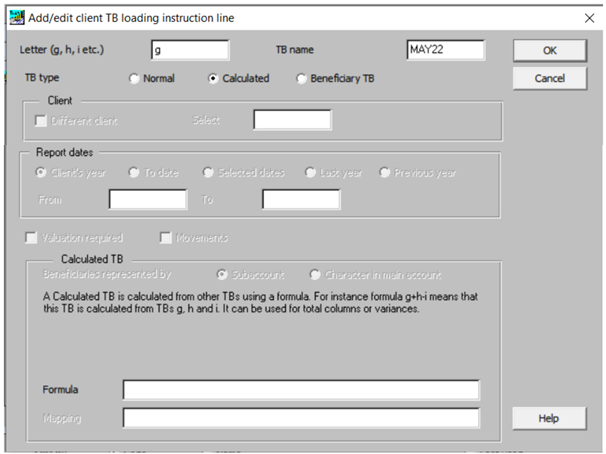
If the TB Type is Calculated only a single field is available, apart from the Letter and the TB Name.
Formula
A calculated TB is calculated from other saved TBs. The formula defines how this calculation is performed, e.g. g+h-i means that the system should add together trial balances g and h and subtract trial balance i. A calculated TB is useful for total columns or variances.
Related documents
Linking to clients in CCH Central
This document provides instructions on how to link and unlink clients from CCH Central in the CCH Trust Accounts system. To link a client, the user must select the client, click "Edit," then "Link," and choose the appropriate client from Central. Once linked, certain fields become non-editable in Trust Accounts. To unlink a client, the user clicks the "Unlink" button, which restores editability but deletes any accounting periods in Central. Key fields updated from Central include client name, address, and contact details.
Database Parameters
Various features in Trust Accounts are optional. To set up many of these, from the Activities menu select System Management, and then Database Parameters.
Data Parameters
Various features in Trust Accounts are optional. To set up many of these, from the Activities menu select System Management, and then Database Parameters.
Database Parameters
Database Parameters
Passwords
Passwords