
Overview: Tangible Fixed Assets
The Tangible Fixed Assets area of CCH Corporation Tax shows the totals of the fixed asset note from the accounts and there are screens to itemise the Additions and Disposals that make up the these totals.
There is a panel that reconciles the detailed Additions and Disposals to the Tangible Fixed Assets totals. The Additions and Disposals are allocated to pools and are used to calculate Capital Allowances.
The Tangible Fixed Assets area of Corporation Tax is shown below with links to the Additions and Disposals.
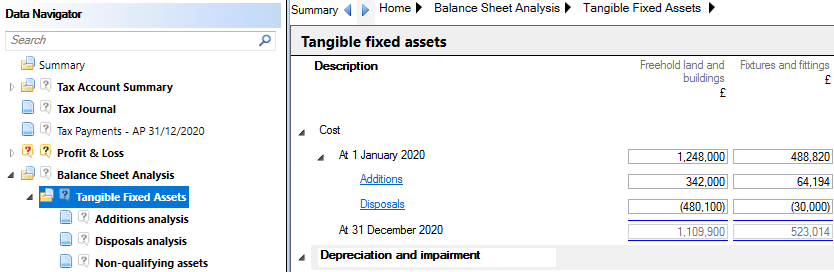
When CCH Accounts Production is in use, the data in the Tangible Fixed Assets area can be imported into CCH Corporation Tax from CCH Accounts Production and the CCH Fixed Asset Register:
- CCH Accounts Production data comes from the fixed asset note in the accounts. This accounts page supplies the headings and the totals shown in the Tangible Fixed Assets screen above.
- CCH Fixed Asset Register supplies the detailed Additions and Disposals.
This topic discusses how the link from CCH Fixed Asset Register to CCH Corporation Tax is set up and run. The areas discussed are:
- Setting Up the Tax Links screen This explains how the link between CCH Fixed Asset Register and CCH Corporation Tax is set up.
- Exporting the data from CCH Accounts Production explains how data is exported from CCH Accounts Production before it can be imported into CCH Corporation Tax.
- Importing the data into CCH Corporation Tax explains how the data can be brought into CCH Corporation Tax.
- Editing Additions and Disposals in Corporation Tax explains how extra tax data can be added to Additions and Disposals in CCH Corporation Tax after they have been imported from CCH Fixed Asset Register.