
Differences Between Importing into Tax from CCH Accounts Production and FAR
When data is imported into Tax, i.e. either Corporation Tax or Personal Tax, the balances come from Accounts Production, while the details of the Additions and Disposals come from the Fixed Asset Register.
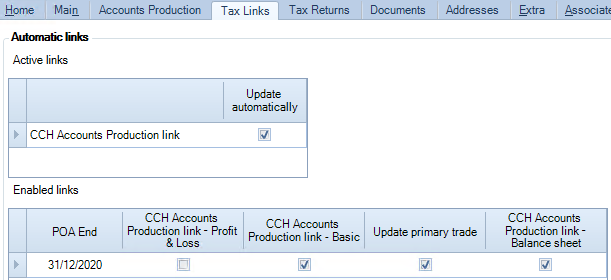
The Tax Links screen appears as follows for Corporation Tax:
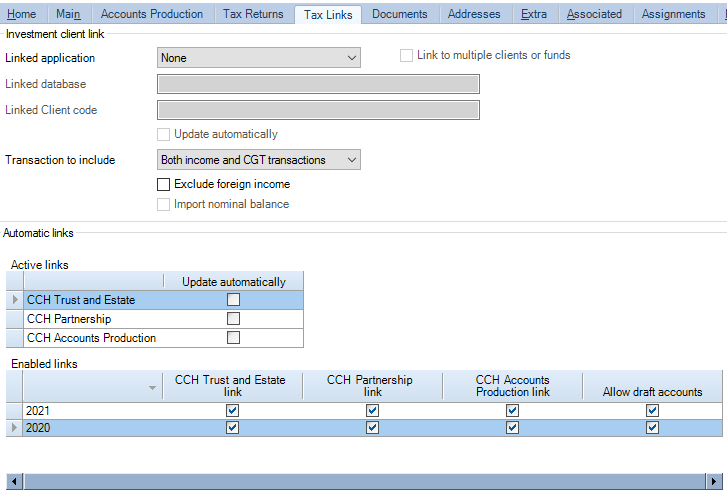
It appears as follows for Personal Tax:
The Fixed Asset Register link can be switched on or off. When it is off, Fixed Asset Register data is in effect unlinked. The Accounts Production link is always on, with the option to run automatically or not. With Corporaton Tax, if you set the link to run automatically, you can also specify which balances are to be imported.
Effect of Enabled Links settings
If Update automatically is unticked for Accounts Production, there is a difference in the function of the Enabled Links setting used to link the Fixed Asset Register.
Corporation Tax
For Corporation Tax, this setting is CCH Accounts Production link - Balance sheet.
CCH Fixed Asset Register - This setting must always be ticked to import Fixed Asset Register data. Otherwise the Fixed Asset Register is unlinked.
CCH Accounts Production - The Enabled Links setting for CCH Accounts Production link - Balance sheet does not affect what data is imported from Accounts Production when Update automatically is unticked. The Accounts Production Balance Sheet data is always imported. The Enabled Links settings only control what data is imported if Update automatically is ticked.
Personal Tax
For Personal Tax, the setting to link the Fixed Asset Register is called CCH Accounts Production link.
CCH Fixed Asset Register - This setting must always be ticked to import Fixed Asset Register data. Otherwise the Fixed Asset Register is unlinked.
CCH Accounts Production - The Enabled Links setting for CCH Accounts Production link setting does not affect whether you can import data from Accounts Production when Update automatically is unticked. The Accounts Production balances are always imported. The setting affects whether a warning is displayed in Errors and Exceptions that data is ready to import. (However, the settings for CCH Trust and Estate link and the CCH Partnership link do enable their respective links).
Editing data in Tax after importing it
CCH Fixed Asset Register Additions and Disposals are imported from the Fixed Asset Register. Some fields on these records exist in the FAR; others do not. Fields imported from the FAR cannot be edited in Tax, although you can edit the other fields. The fields that are not editable are greyed out. If you edit one of the editable fields and then update Corporation Tax a second time, the manual edits are retained.
CCH Accounts Production Data imported from Accounts Production can be edited in Tax. This means that if Tax is updated a second time, manual edits are lost.
Unlinking data
CCH Fixed Asset Register
To unlink the Fixed Asset Register for Corporation Tax, untick the CCH Accounts Production link - Balance sheet setting
To unlink the Fixed Asset Register for for Personal Tax, untick the CCH Accounts Production link setting.
When the Fixed Asset Register data is unlinked, the FAR fields on Additions and Disposals that could not be edited before become editable and, if Tax is subsequently updated, no further data is imported from the FAR. Any manual changes are retained.
CCH Accounts Production - If you export the data from Accounts Production and import it into Tax, it will always overwrite any manual changes in Tax.