
Known Issue
CCH Making Tax Digital for VAT - Known Issues
CCH IFirm MTD For VAT
CCH Making Tax Digital for VAT - Known Issues
Last update: 16 Jan 2020
| Date Raised | ITS | Description | Workaround ( If applicable) | Scheduled/Resolved |
|---|---|---|---|---|
| 16/01/2020 | 120651 | Cannot upload a spreadsheet using Microsoft Edge – There is an internal conflict between the controls we use and Microsoft Edge | Use an alternative browser until the controls are updated | TBC |
| 16/01/2020 | Spreadsheet formula is using “GETPIVOTDATA” and may not return the correct values. | Workaround – Until Spreadsheetgear control is updated to work with this command, the only option is to use the Digital links method to submit the return to mtdfvat as per kb10996 | TBC | |
| 05/12/2019 |
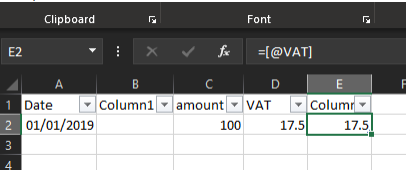
Spreadsheet formula has incompatible error in validation When uploaded to CCH MTD f VAT the validation returns the error “'COVER SHEET'!C24 contains an incompatible formula. Please contact support” Where the data is organised in a table and the table includes calculations using the @ to reference other data in that row, the formula cannot be understood by the tools we use to validate the 9 box information. In this example below the [@VAT] is referring to another cell in the row in the table. |
Workaround – Until Spreadsheetgear control is updated to work with this command, the only option is to use the Digital links method to submit the return to mtdfvat as per kb10996 | TBC | |
| 09/07/2019 | 96019 | Invalid_Grant – error being returned when viewing an unsubmitted VAT return | First try closing CCH OneClick, then reopen page that errors, if this fails then try clearing the authorisation and reauthorising. | 3.3 |
| 29/05/2019 | In MTD the Other details header card is not visible | Change zoom setting in browser until card is visible | TBC | |
| 29/05/2019 | 89961 | Improve progress messaging when uploading a large file takes too long to load (applies to files over 75MB) | Use the digital link method to link figures from the large spreadsheet to a cleaner smaller one | 3.2 |
| 14/05/2019 | On an almost daily clients are calling support saying that the “Add return” button is missing from the Advisor workspace | Remove the VAT Returns option from the Selected CCH OneClick features for the specified client and send it back to the Available CCH OneClick Features list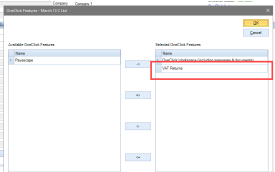 |
N/A | |
| 11/12/2018 | 65174 | Not scaling if txt size set to 150% If the text size is set to 150% then some screens are not displaying correctly |
3.0 | |
| 28/01/2019 | 77986 | Excel spreadsheet is failing Box 5 validation Some spreadsheets are generating figures with more than 2 decimal places but displaying it as only 2dp. The spreadsheet validation is then failing the box values as amounts submitted to HMRC can only be 2dp |
The valudation routine will be updated to round the amounts to 2dp where required. | 2.9 |
| 08/01/2019 | TBC | Updating of liabilities information on Digital VAT account slow. The liabilities information is not updating immediately after submitting a VAT return to HMRC. Clients are reporting that it can take up to several hours to return the updated information. |
This situation is being investigated. Generaly this is caused by a delay with the HMRC systems. It can take 24 – 48 hours to show the liability. | N/A |
| 01/02/2019 | 78202 | Invalid spreadsheet format When adding a return if the spreadsheet is not in an valid excel format this is the error returned.  |
The error message has been updated to be more specific. Workaround: The spreadsheet will need to be resaved in to either .xls or .xlsx format |
2.9 |
| 04/02/2019 | 78318 | Spreadsheet verification The spreadsheet verifification is returning a box value of 0 when the spreadsheet value is not zero and not marking this as a fail. This is caused by the spreadsheet using an Excel function that our controls do not recognise. |
The verification will now identify cells that contain unrecognised formula and flag this as a fail. | 2.9 |
| 14/02/2019 | 76432 | Screen blocked Cancel or Close actions, on "Load VAT spreadsheet" pop-up will block all the page actions |
Only happens the first time the user does this action. If screen is blocked press F5 to refresh, the screen will now be unblocked | 2.9 |
| 08/03/2019 | Payments - error: “The remote endpoint has indicated that no data can be found” This message is appearing when users click on the Payments tab |
The HMRC API can only return payments made after the client has signed up to MTD f VAT. Any Payemts\refunds made or received prior to sign up are not accesable to the software. Once a payent has been made under MTD f VAT this error should not appear. | N/A | |
| 13/03/2019 | 85512 | Liabilities screen not showing all liabilities If the year for the Start & End dates of the obligation are not the same the liability is exluded from the displayed information |
None | 2.9 |
Useful Information! Join the CCH OneClick 'Group' on our Support Portal for automatic 'Posts' relating to CCH Making Tax Digital for VAT.
Related documents
Submit a VAT Return via MTD for VAT in CCH IFirm 0610206 Dup test
Learn how to complete and submit a VAT return using Making Tax Digital (MTD) for VAT in CCH IFirm. This guide covers all prerequisites, step-by-step process, and common troubleshooting for practices submitting VAT returns for their clients.
VAT submission fails when Agent Services Account credentials expire Demo
A VAT return submission may fail with an HMRC authentication error if the firm’s Agent Services Account credentials have expired and have not been updated in CCH IFirm.
VAT submission fails when Agent Services Account credentials expire without warning
A VAT return submission may fail if the firm’s Agent Services Account credentials have expired and have not been updated in CCH IFirm, as the system does not currently provide an expiry warning.
Submit a VAT return using MTD for VAT in CCH IFirm
This article explains how to submit a VAT return to HMRC using Making Tax Digital for VAT in CCH IFirm, from checking prerequisites through to successful submission and confirmation.