
How To
Add/edit TB loading instruction line screen
CCH Trust Accounts
The Add/Edit TB Loading Instruction Line screen appears as follows. It is the same for both Master and Client TB Loading instructions.
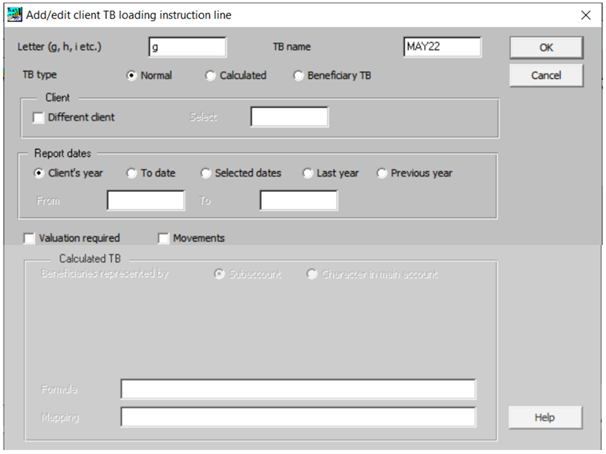
TB Type
The options that appear depend on the TB type. The three types are:
- Normal. The options for a Normal TB are shown above and they are described below.
- Calculated. This is used for performing calculations based on other Saved Trial Balances.
- Beneficiary TB. This is used to produce a trial balance for a beneficiary when each beneficiary is represented either by its own sub-account or by a character in the account code. It is explained in Beneficiary TB Concepts and Beneficiary TB Screen.
Related documents
Linking to clients in CCH Central
This document provides instructions on how to link and unlink clients from CCH Central in the CCH Trust Accounts system. To link a client, the user must select the client, click "Edit," then "Link," and choose the appropriate client from Central. Once linked, certain fields become non-editable in Trust Accounts. To unlink a client, the user clicks the "Unlink" button, which restores editability but deletes any accounting periods in Central. Key fields updated from Central include client name, address, and contact details.
Database Parameters
Various features in Trust Accounts are optional. To set up many of these, from the Activities menu select System Management, and then Database Parameters.
Data Parameters
Various features in Trust Accounts are optional. To set up many of these, from the Activities menu select System Management, and then Database Parameters.
Database Parameters
Database Parameters
Passwords
Passwords